Customer Monthly Sales Report - Complete Implementation Guide
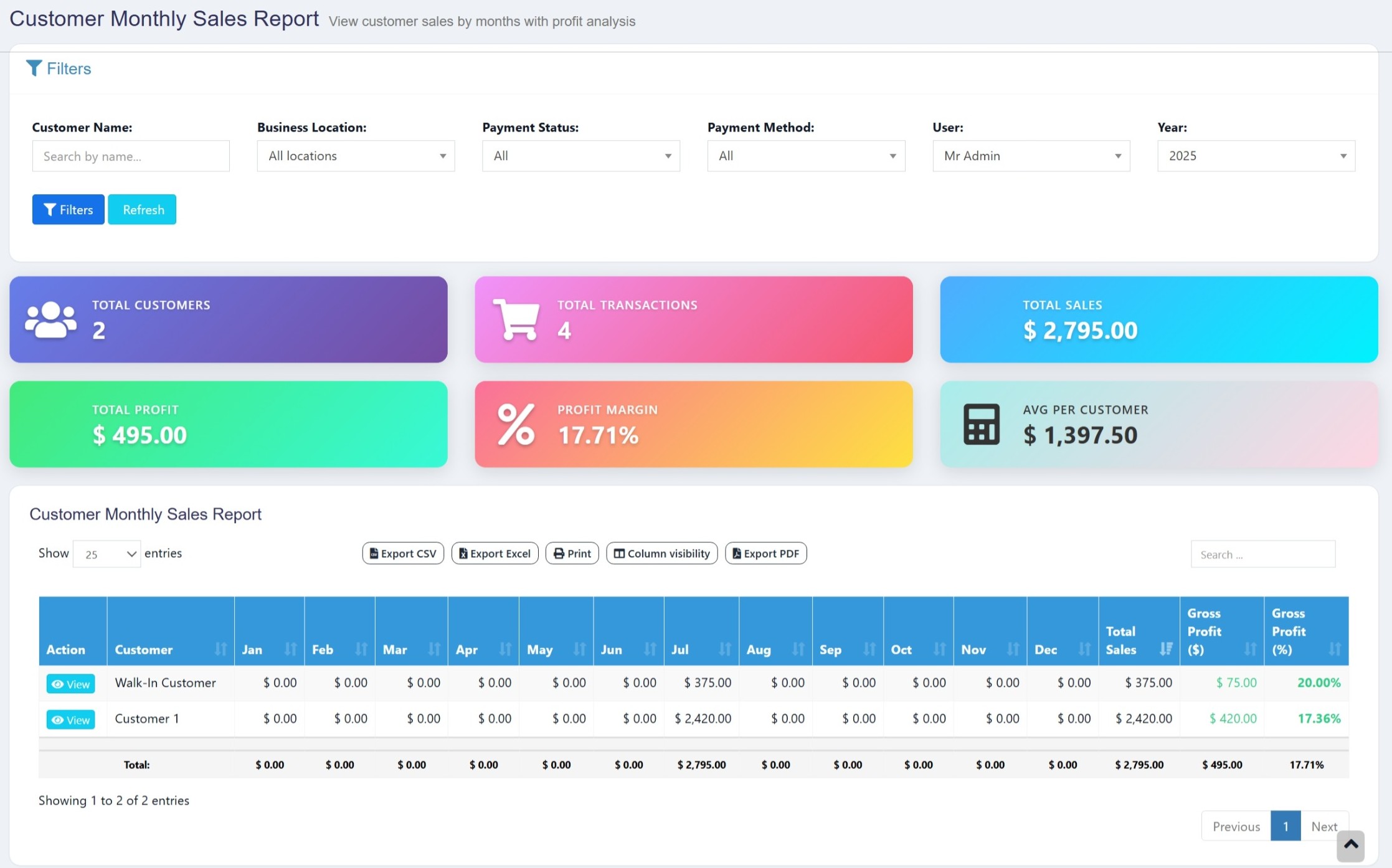
This comprehensive guide walks you through implementing a powerful Customer Monthly Sales Report feature in Ultimate POS, providing detailed insights into customer purchasing patterns with monthly breakdowns and profit analysis.
Overview
The Customer Monthly Sales Report feature provides:
- Monthly Sales Breakdown: View sales for each customer across all 12 months
- Profit Analysis: Calculate gross profit and profit margins per customer
- Summary Statistics: Total customers, transactions, sales, and profit metrics
- Advanced Filtering: Filter by location, payment status, staff, and more
- Customer Details Modal: Detailed view of individual customer transactions
- Responsive Design: Modern UI with interactive summary cards
Prerequisites
- Ultimate POS system installed and running
- Laravel 8+ with proper database setup
- Access to database and codebase
- Basic knowledge of Laravel, PHP, Blade templates, and DataTables
- Understanding of database relationships
Step 1: Database Structure
The report uses existing Ultimate POS tables. Ensure these tables exist and have proper relationships:
-- Core tables used
- transactions
- transaction_sell_lines
- transaction_sell_lines_purchase_lines
- purchase_lines
- contacts
- variations
- products
- business_locations
- users
Loading...
💛 Support this project