Combo Product Auto-Addition in POS - v6.10
Version History
Version 3.1 (2025-12-03) - Ultimate POS v6.10
- Fixed: Combo products now respect "Sales Item Addition Method" setting
- Fixed: Quantity increment uses correct value (not string concatenation)
- Added:
variation_idandquantityto AJAX response for duplicate detection - Added:
pos_add_product_row_from_data()helper function - Updated: Product grid click handler for consistent combo handling
Version 3.0 (2025-01-28) - Ultimate POS v6.10
- Updated for Ultimate POS v6.10 architecture changes
- Business logic moved from SellPosController to ProductUtil
- Enhanced search functionality with combo_variations support
- Improved frontend JavaScript with better error handling
- Added comprehensive product box support
- Full backward compatibility maintained
Version 2.0 (2025-10-31) - Ultimate POS v6.9
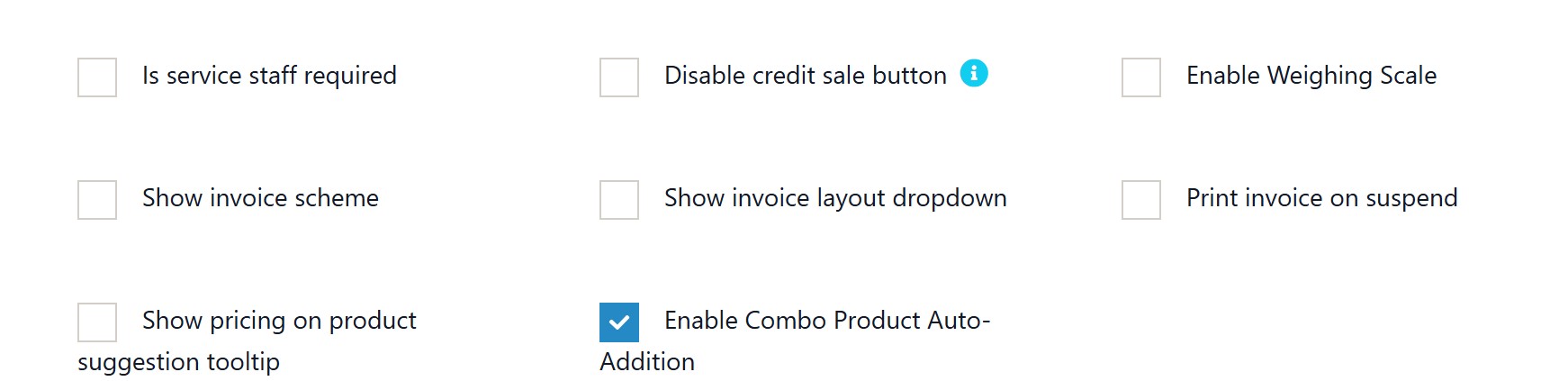
- Added business setting to enable/disable the feature
- Added UI checkbox in Business Settings → POS tab
- Made feature toggleable per business
- Enabled by default for new installations
Version 1.0 (2025-10-29) - Ultimate POS v6.9
- Initial implementation
- Always auto-added combo children
Overview
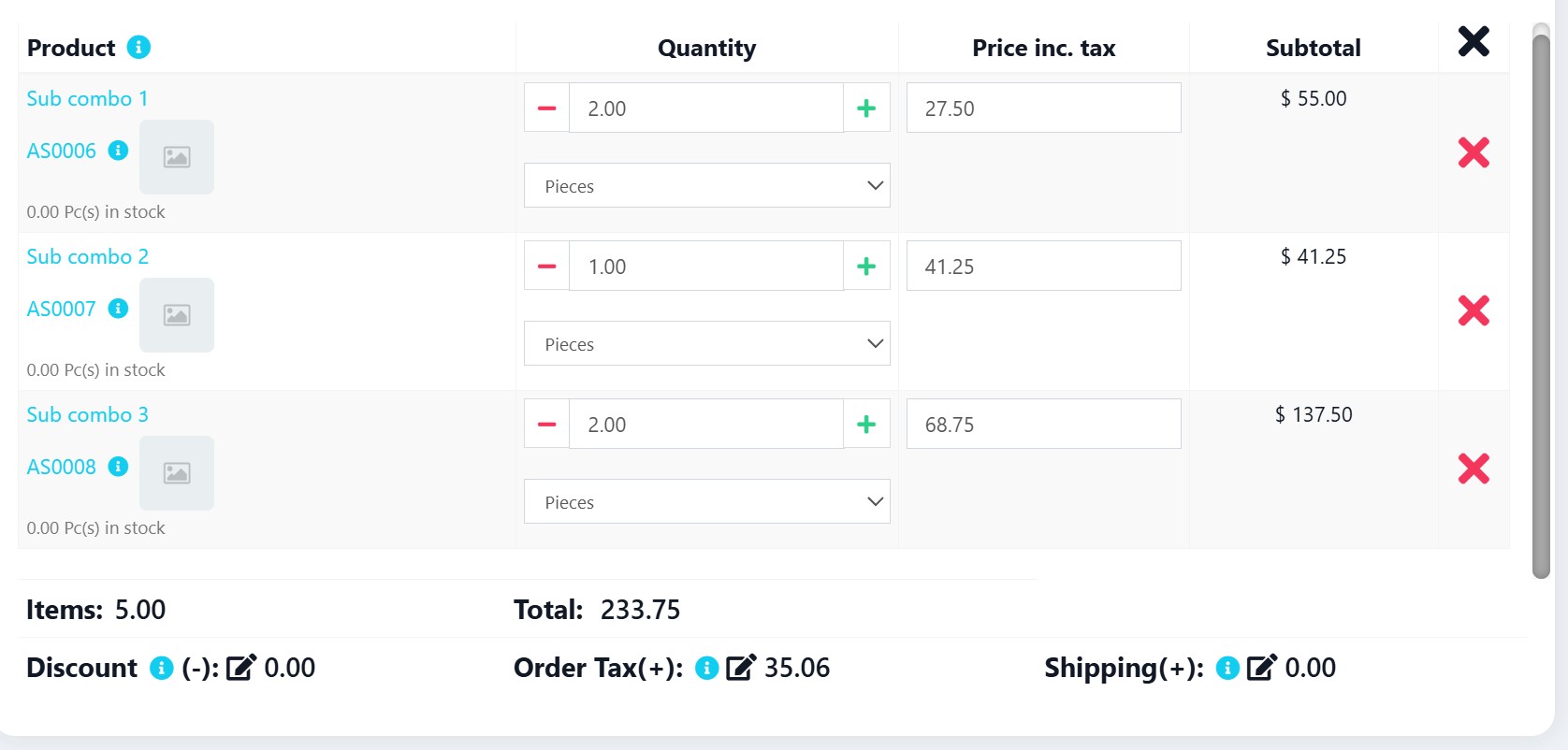
This feature automatically adds all individual products within a combo product as separate line items when the combo is selected in POS, eliminating the need for manual product addition. The feature includes a business setting to enable or disable this behavior.
Features
- Auto-detect combo products in search autocomplete
- Auto-detect combo products in product boxes/grid
- Add all child products as individual rows with correct quantities
- Works with product search autocomplete
- Works with product box clicks
- Maintains proper stock tracking for each component
- Business setting to enable/disable feature
- Enabled by default for new installations
- Visual combo indicators in product grid
- Enhanced v6.10 architecture support
- Respects "Sales Item Addition Method" setting (add new row vs increase quantity)
- Correct quantity increment for all product types
Architecture Changes in v6.10
Key Differences from v6.9
-
Business Logic Migration
- v6.9: Logic in
SellPosController->getProductRow() - v6.10: Logic moved to
ProductUtil->getPosProductRow()
- v6.9: Logic in
-
Enhanced Search System
- v6.10: Requires
combo_variationsin search results - Multiple search endpoints need updating
- v6.10: Requires
-
Frontend Improvements
- Enhanced product search with
performProductSearch() - Better row processing for multiple combo children
- Helper function for duplicate detection
- Enhanced product search with
Files Modified
├── app/
│   ├── Http/Controllers/
│   │   └── SellPosController.php          # Product suggestion search (combo_variations field)
│   └── Utils/
│       ├── BusinessUtil.php               # Default POS settings
│       └── ProductUtil.php                # Main combo logic + search results + output fields
├── lang/
│   └── en/
│       └── lang_v1.php                    # Language strings
├── resources/
│   └── views/
│       ├── business/
│       │   └── partials/
│       │       └── settings_pos.blade.php  # Business setting checkbox
│       ├── sale_pos/
│       │   ├── create.blade.php           # Expose settings to JavaScript
│       │   └── partials/
│       │       └── product_list.blade.php # Product box enhancements
└── public/js/
    └── pos.js                             # Frontend logic + row processing + duplicate detection
Implementation Steps
Step 1: Add Language Strings
File: lang/en/lang_v1.php
Location: Around line 81, after disable_order_tax
Add:
'enable_combo_product_auto_addition' => 'Enable Combo Product Auto-Addition',
'combo_auto_addition_help' => 'When enabled, selecting a combo product will automatically add all child products as separate line items',
Step 2: Update Default POS Settings
File: app/Utils/BusinessUtil.php
Location: Inside defaultPosSettings() method around line 419
Find:
return ['disable_pay_checkout' => 0, 'disable_draft' => 0, 'disable_express_checkout' => 0, 'hide_product_suggestion' => 0, 'hide_recent_trans' => 0, 'disable_discount' => 0, 'disable_order_tax' => 0, 'is_pos_subtotal_editable' => 0];
Replace with:
return ['disable_pay_checkout' => 0, 'disable_draft' => 0, 'disable_express_checkout' => 0, 'hide_product_suggestion' => 0, 'hide_recent_trans' => 0, 'disable_discount' => 0, 'disable_order_tax' => 0, 'is_pos_subtotal_editable' => 0, 'enable_combo_product_auto_addition' => 1];
Step 3: Add Business Setting Checkbox
File: resources/views/business/partials/settings_pos.blade.php
Location: Around line 329, after the last checkbox in settings section
Add:
<div class="col-sm-12">
    <div class="form-group">
        <div class="checkbox">
        <br>
            <label>
                {!! Form::checkbox('pos_settings[enable_combo_product_auto_addition]', 1,
                    !empty($pos_settings['enable_combo_product_auto_addition']) ? true : false ,
                [ 'class' => 'input-icheck']); !!} {{ __( 'lang_v1.enable_combo_product_auto_addition' ) }}
                @show_tooltip(__('lang_v1.combo_auto_addition_help'))
            </label>
        </div>
    </div>
</div>
Step 4: Update ProductUtil - getSellLineRow Output
File: app/Utils/ProductUtil.php
Location: Inside getSellLineRow() method, find where output is set (around line 2579)
Find:
$output['success'] = true;
$output['enable_sr_no'] = $product->enable_sr_no;
Replace with:
$output['success'] = true;
$output['enable_sr_no'] = $product->enable_sr_no;
$output['variation_id'] = $variation_id;
$output['quantity'] = $quantity;
Step 5: Update ProductUtil - getPosProductRow with Combo Logic
File: app/Utils/ProductUtil.php
Location: Inside getPosProductRow() method around line 2653
Find:
$output = $this->getSellLineRow($variation_id, $location_id, $quantity, $row_count, $is_direct_sell, $is_serial_no);
Replace with:
// Check for combo auto-addition (NEW LOGIC FOR V6.10)
$business_id = request()->session()->get('user.business_id');
$business_util = new BusinessUtil();
$business_details = $business_util->getDetails($business_id);
$pos_settings = empty($business_details->pos_settings) ? $business_util->defaultPosSettings() : json_decode($business_details->pos_settings, true);

// Get variation and product details to check if it's a combo
$variation = \App\Variation::find($variation_id);
$product = \App\Product::find($variation->product_id);

if ($product->type == 'combo' && !empty($variation->combo_variations) && !empty($pos_settings['enable_combo_product_auto_addition'])) {
    // Auto-add all child products instead of the combo itself
    $output['success'] = true;
    $output['html_content'] = '';
    $output['is_combo'] = true;
    $output['combo_count'] = 0;

    foreach ($variation->combo_variations as $combo_item) {
        $child_quantity = $combo_item['quantity'] * $quantity;
        $child_output = $this->getSellLineRow($combo_item['variation_id'], $location_id, $child_quantity, $row_count, $is_direct_sell, $is_serial_no);

        if ($child_output['success']) {
            $output['html_content'] .= $child_output['html_content'];
            $row_count++;
            $output['combo_count']++;
        }
    }
} else {
    // Normal product handling
    $output = $this->getSellLineRow($variation_id, $location_id, $quantity, $row_count, $is_direct_sell, $is_serial_no);
}
Also find the modifiers section and update:
// Add modifiers if restaurant module is enabled (skip for combo auto-addition)
$transaction_util = new TransactionUtil();
if ($transaction_util->isModuleEnabled('modifiers') && !$is_direct_sell && empty($output['is_combo'])) {
    $modifier_variation = \App\Variation::find($variation_id);
    $this_product = \App\Product::where('business_id', $business_id)
        ->with(['modifier_sets'])
        ->find($modifier_variation->product_id);
    if ($this_product && count($this_product->modifier_sets) > 0) {
        $product_ms = $this_product->modifier_sets;
        $output['html_modifier'] = view('restaurant.product_modifier_set.modifier_for_product')
            ->with(compact('product_ms', 'row_count'))->render();
    }
}
Step 6: Add combo_variations to Search Results
File: app/Utils/ProductUtil.php
Location: Inside filterProduct() method around line 1727
Find:
$query->select(
    'products.id as product_id',
    'products.name',
    'products.type',
    'products.enable_stock',
    'variations.id as variation_id',
    'variations.name as variation',
    'VLD.qty_available',
    'variations.sell_price_inc_tax as selling_price',
    'variations.sub_sku',
    'U.short_name as unit'
);
Replace with:
$query->select(
    'products.id as product_id',
    'products.name',
    'products.type',
    'products.enable_stock',
    'variations.id as variation_id',
    'variations.name as variation',
    'VLD.qty_available',
    'variations.sell_price_inc_tax as selling_price',
    'variations.sub_sku',
    'U.short_name as unit',
    'variations.combo_variations'  // Added for combo product auto-addition feature
);
Step 7: Update Product Suggestion Search
File: app/Http/Controllers/SellPosController.php
Location: Inside getProductSuggestion() method around line 1908
Find:
$products = $products->select(
    'p.id as product_id',
    'p.name',
    'p.type',
    'p.enable_stock',
    'p.image as product_image',
    'variations.id',
    'variations.name as variation',
    'VLD.qty_available',
    'variations.default_sell_price as selling_price',
    'variations.sub_sku',
    'u.short_name as unit'
)
Replace with:
$products = $products->select(
    'p.id as product_id',
    'p.name',
    'p.type',
    'p.enable_stock',
    'p.image as product_image',
    'variations.id',
    'variations.name as variation',
    'VLD.qty_available',
    'variations.default_sell_price as selling_price',
    'variations.sub_sku',
    'u.short_name as unit',
    'variations.combo_variations'  // Added for combo product auto-addition feature
)
Step 8: Add Helper Function for Product Row Data
File: public/js/pos.js
Location: Before the pos_product_row() function
Add this new function:
// Helper function to add product row from server data
function pos_add_product_row_from_data(result) {
    if (result.success) {
        var variation_id = result.variation_id;
        var quantity = parseFloat(result.quantity) || 1;
        var add_new_row = true;

        // Check item addition method setting
        var item_addtn_method = 0;
        if ($('#item_addition_method').length) {
            item_addtn_method = $('#item_addition_method').val();
        }

        // If item_addtn_method != 0, check for duplicate products
        if (item_addtn_method != 0 && variation_id) {
            var is_added = false;

            // Search for variation id in each row of pos table
            $('#pos_table tbody')
                .find('tr')
                .each(function() {
                    var row_v_id = $(this).find('.row_variation_id').val();
                    var enable_sr_no = $(this).find('.enable_sr_no').val();
                    var modifiers_exist = false;
                    if ($(this).find('input.modifiers_exist').length > 0) {
                        modifiers_exist = true;
                    }

                    if (
                        row_v_id == variation_id &&
                        enable_sr_no !== '1' &&
                        !modifiers_exist &&
                        !is_added
                    ) {
                        add_new_row = false;
                        is_added = true;

                        // Increment product quantity by the requested quantity
                        var qty_element = $(this).find('.pos_quantity');
                        var qty = __read_number(qty_element);
                        __write_number(qty_element, qty + quantity);
                        qty_element.change();

                        round_row_to_iraqi_dinnar($(this));

                        if (!$('#__is_mobile').length) {
                            $('input#search_product')
                                .focus()
                                .select();
                        }
                    }
            });
        }

        // Add new row if not a duplicate
        if (add_new_row) {
            pos_insert_product_row(result);
        }
    } else {
        toastr.error(result.msg);
        if (!$('#__is_mobile').length) {
            $('input#search_product')
                .focus()
                .select();
        }
    }
}
Step 9: Update pos_product_row Function
File: public/js/pos.js
Location: At the start of pos_product_row() function
Add quantity parsing at the beginning of the function:
function pos_product_row(variation_id = null, purchase_line_id = null, weighing_scale_barcode = null, quantity = 1) {
    // Ensure quantity is a number
    quantity = parseFloat(quantity) || 1;

    //Get item addition method
    // ... rest of existing code
Also update the quantity increment inside the duplicate check loop:
Find:
__write_number(qty_element, qty + 1);
Replace with:
__write_number(qty_element, qty + quantity);
Step 10: Update AJAX Success Handler
File: public/js/pos.js
Location: Inside pos_product_row() function, find the AJAX success handler
Find:
success: function(result) {
    if (result.success) {
        pos_insert_product_row(result);
    } else {
        toastr.error(result.msg);
        if (!$('#__is_mobile').length) {
            $('input#search_product')
                .focus()
                .select();
        }
    }
},
Replace with:
success: function(result) {
    if (result.success) {
        // Use pos_add_product_row_from_data to respect item_addition_method setting
        pos_add_product_row_from_data(result);
    } else {
        toastr.error(result.msg);
        if (!$('#__is_mobile').length) {
            $('input#search_product')
                .focus()
                .select();
        }
    }
},
Step 11: Update Frontend JavaScript for Search Autocomplete
File: public/js/pos.js
Location: Inside autocomplete select handler around line 305
Find:
//Pre select lot number only if the searched term is same as the lot number
var purchase_line_id = ui.item.purchase_line_id && searched_term == ui.item.lot_number ? ui.item.purchase_line_id : null;
pos_product_row(ui.item.variation_id, purchase_line_id);
Replace with:
// Check if combo product - add all child products instead (only if enabled in settings)
if (ui.item.type === 'combo' && ui.item.combo_variations && typeof pos_settings !== 'undefined' && pos_settings.enable_combo_product_auto_addition) {
    var combo_variations = ui.item.combo_variations;
    if (typeof combo_variations === 'string') {
        try {
            combo_variations = JSON.parse(combo_variations);
        } catch (e) {
            console.error('Failed to parse combo_variations:', e);
            combo_variations = null;
        }
    }

    if (combo_variations && Array.isArray(combo_variations)) {
        for (var i = 0; i < combo_variations.length; i++) {
            var child = combo_variations[i];
            if (child.variation_id && child.quantity) {
                pos_product_row(child.variation_id, null, null, child.quantity);
            }
        }
    }
} else {
    //Pre select lot number only if the searched term is same as the lot number
    var purchase_line_id = ui.item.purchase_line_id && searched_term == ui.item.lot_number ? ui.item.purchase_line_id : null;
    pos_product_row(ui.item.variation_id, purchase_line_id);
}
Step 12: Update Product Grid Click Handler
File: public/js/pos.js
Location: Find the product_box click handler
Find:
$(document).on('click', 'div.product_box', function() {
    //Check if location is not set then show error message.
    if ($('input#location_id').val() == '') {
        toastr.warning(LANG.select_location);
    } else {
        pos_product_row($(this).data('variation_id'));
    }
});
Replace with:
$(document).on('click', 'div.product_box', function() {
    //Check if location is not set then show error message.
    if ($('input#location_id').val() == '') {
        toastr.warning(LANG.select_location);
    } else {
        var variation_id = $(this).data('variation_id');
        var product_type = $(this).data('product_type');
        var combo_variations = $(this).data('combo_variations');

        // Check if combo product with auto-addition enabled
        if (product_type === 'combo' && combo_variations && typeof pos_settings !== 'undefined' && pos_settings.enable_combo_product_auto_addition) {
            // Auto-add all child products instead of the combo itself
            if (Array.isArray(combo_variations)) {
                for (var i = 0; i < combo_variations.length; i++) {
                    var child = combo_variations[i];
                    if (child.variation_id && child.quantity) {
                        pos_product_row(child.variation_id, null, null, child.quantity);
                    }
                }
            }
        } else {
            // Normal product or combo without auto-addition
            pos_product_row(variation_id);
        }
    }
});
Step 13: Update Frontend Row Processing
File: public/js/pos.js
Location: Inside pos_insert_product_row() function
Find the row count increment and row processing section and ensure it handles combo products:
// Increment row count (combo products add multiple rows)
var rows_added = result.combo_count || 1;
$('input#product_row_count').val(parseInt(product_row) + rows_added);

// Process all newly added rows
if (result.is_combo) {
    // For combo, process all added rows
    $('table#pos_table tbody tr').slice(-rows_added).each(function() {
        pos_each_row($(this));
        var line_total = __read_number($(this).find('input.pos_line_total'));
        $(this).find('span.pos_line_total_text').text(line_total);

        //Check if multipler is present then multiply it when a new row is added.
        if (__getUnitMultiplier($(this)) > 1) {
            $(this).find('select.sub_unit').trigger('change');
        }

        round_row_to_iraqi_dinnar($(this));
        __currency_convert_recursively($(this));
    });
} else {
    var this_row = $('table#pos_table tbody')
        .find('tr')
        .last();
    pos_each_row(this_row);

    //For initial discount if present
    var line_total = __read_number(this_row.find('input.pos_line_total'));
    this_row.find('span.pos_line_total_text').text(line_total);

    //Check if multipler is present then multiply it when a new row is added.
    if (__getUnitMultiplier(this_row) > 1) {
        this_row.find('select.sub_unit').trigger('change');
    }

    if (result.enable_sr_no == '1') {
        var new_row = $('table#pos_table tbody')
            .find('tr')
            .last();
        new_row.find('.row_edit_product_price_model').modal('show');
    }

    round_row_to_iraqi_dinnar(this_row);
    __currency_convert_recursively(this_row);
}

pos_total_row();
Step 14: Enhanced Product Box Support
File: resources/views/sale_pos/partials/product_list.blade.php
Location: Around line 3
Find:
<div class="product_box hover:tw-shadow-lg hover:tw-animate-pulse" data-variation_id="{{$product->id}}" title="...">
Replace with:
<div class="product_box hover:tw-shadow-lg hover:tw-animate-pulse" data-variation_id="{{$product->id}}" data-product_type="{{$product->type}}" @if($product->type == 'combo' && !empty($product->combo_variations)) data-combo_variations="{{json_encode($product->combo_variations)}}" @endif title="...">
Also find the product name section and add combo indicator:
<small class="text text-muted">{{$product->name}}
@if($product->type == 'variable')
    - {{$product->variation}}
@endif
@if($product->type == 'combo')
    <span class="label label-info" style="font-size: 9px; margin-left: 5px;">COMBO</span>
@endif
</small>
Step 15: Expose Settings to JavaScript
File: resources/views/sale_pos/create.blade.php
Location: At the end of the JavaScript section, before @endsection
Add:
<script>
    // Initialize POS settings for JavaScript access (combo auto-addition feature)
    var pos_settings = @json($pos_settings);
</script>
Step 16: Handle Checkbox Value in Business Settings Controller
File: app/Http/Controllers/BusinessController.php
Location: Inside postBusinessSettings() method, find the section where $default_pos_settings is set (around line 467)
Find:
$default_pos_settings = $this->businessUtil->defaultPosSettings();
foreach ($default_pos_settings as $key => $value) {
    if (! isset($pos_settings[$key])) {
        $pos_settings[$key] = $value;
    }
}
Replace with:
// Handle enable_combo_product_auto_addition checkbox explicitly
// Unchecked checkboxes don't send any value, so set 0 explicitly
$pos_settings['enable_combo_product_auto_addition'] = !empty($pos_settings['enable_combo_product_auto_addition']) ? 1 : 0;

$default_pos_settings = $this->businessUtil->defaultPosSettings();
foreach ($default_pos_settings as $key => $value) {
    if (! isset($pos_settings[$key])) {
        $pos_settings[$key] = $value;
    }
}
Important: This step is critical! Without this explicit handling, the checkbox setting will not persist when disabled.
Testing Instructions
Test Case 1: Business Setting Toggle
- Go to Business Settings → POS tab
- Check/Uncheck "Enable Combo Product Auto-Addition"
- Save settings
- Go to POS screen and test combo selection
- Expected: Feature toggles correctly
Test Case 2: Search Autocomplete (When Enabled)
- Ensure setting is enabled
- Go to POS screen
- Type combo product name in search
- Select combo from autocomplete
- Expected: All child products appear as individual rows
Test Case 3: Product Box Click (When Enabled)
- Ensure setting is enabled
- Go to POS screen
- Look for products with blue "COMBO" badge
- Click combo product box
- Expected: All child products appear as individual rows
Test Case 4: Quantity Verification
- Add combo product
- Verify child quantities = combo quantity × child quantity
- Expected: Correct quantity calculations
Test Case 5: Disabled State
- Disable setting in Business Settings
- Test combo selection
- Expected: Traditional single-row combo behavior
Test Case 6: Sales Item Addition Method - Increase Quantity
- Go to Settings > Business Settings > Sales tab
- Set "Sales Item Addition Method" to "Increase item quantity"
- Go to POS screen
- Add a combo product (or any product)
- Click the same product again (via search or grid)
- Expected: Quantity increases correctly, no new row created
Test Case 7: Combo Quantity Increment
- Set "Sales Item Addition Method" to "Increase item quantity"
- Add a combo product with child quantity 4
- Click the same combo product again
- Expected: Quantity becomes 8 (not "44" string concatenation)
How It Works
Business Setting Control
Location: Business Settings → POS tab → "Enable Combo Product Auto-Addition"
Default: Enabled (1) for new installations
Storage: business.pos_settings JSON column
Dual-Path Architecture
Path 1: Search Autocomplete (Frontend)
User searches → Check pos_settings.enable_combo_product_auto_addition
→ If enabled: Autocomplete detects type='combo'
→ Parse combo_variations JSON → Loop children
→ Call pos_product_row() for each → Individual rows added
Path 2: Product Box Click (Backend)
User clicks box → Backend loads pos_settings in ProductUtil
→ Check enable_combo_product_auto_addition setting
→ If enabled: getPosProductRow() detects combo in ProductUtil
→ Loop children → Generate HTML for all → Return concatenated
→ Frontend processes multiple rows at once
Sales Item Addition Method Flow
Product added via AJAX → pos_add_product_row_from_data() called
→ Check item_addition_method setting
→ If "Increase quantity": Search for existing row with same variation_id
→ If found: Increment quantity by parseFloat(result.quantity)
→ If not found: Add new row via pos_insert_product_row()
Data Flow
// Combo variations structure in database
{
  "combo_variations": [
    {
      "variation_id": 123,
      "product_id": 45,
      "quantity": 2,
      "unit_id": 1
    }
  ]
}
Troubleshooting
Issue: Combo products not auto-adding
Solution:
- Check Business Settings → POS → "Enable Combo Product Auto-Addition"
- Verify
pos_settingsJavaScript variable is available - Check that combo products have
combo_variationsdata - Clear browser cache and run
php artisan cache:clear
Issue: Search not showing combo products
Solution:
- Verify combo products are assigned to current location
- Check that
combo_variationsfield is in search queries - Ensure combo products have proper variations created
- Check Laravel logs for any errors
Issue: JavaScript error "pos_settings is not defined"
Solution:
- Verify
var pos_settings = @json($pos_settings);increate.blade.php - Check that
$pos_settingsis passed to the view - Ensure script tag is in the correct location
Issue: Combo creates new row instead of increasing quantity
Solution:
- Ensure the AJAX handler uses
pos_add_product_row_from_data() - Verify
variation_idandquantityare in the server response - Clear browser cache
Issue: Quantity shows as concatenated string (e.g., "44" instead of "8")
Solution:
- Ensure
parseFloat()is used when reading quantity values - Check that
pos_product_rowhasquantity = parseFloat(quantity) || 1; - Check that
pos_add_product_row_from_datahasvar quantity = parseFloat(result.quantity) || 1;
Best Practices
- Always test with different combo configurations (2-5 child products)
- Verify stock levels for all child products
- Test performance with complex combos
- Train staff that combos now add multiple rows when enabled
- Monitor Laravel logs during testing for any errors
- Test both "Add new row" and "Increase quantity" settings
Important Notes
- Feature is toggleable via Business Settings
- Enabled by default for new installations
- Maintains backward compatibility when disabled
- Works with both search and product boxes
- Proper stock tracking for each child product
- Enhanced v6.10 architecture support
- Respects "Sales Item Addition Method" setting
- Quantity increment uses parseFloat() to avoid string concatenation
Migration from v6.9
If you're upgrading from the v6.9 implementation:
- Remove old SellPosController changes
- Apply all v6.10 changes above
- Test thoroughly with existing combo products
- Check that settings are preserved
Last Updated: 2025-12-03 Version: 3.1 - Ultimate POS v6.10 Compatible Tested On: Ultimate POS 6.10
💛 Support this project