Product Price Check System
A comprehensive guide for implementing a standalone product price check page with barcode scanning capabilities for Ultimate POS.
📋 Overview
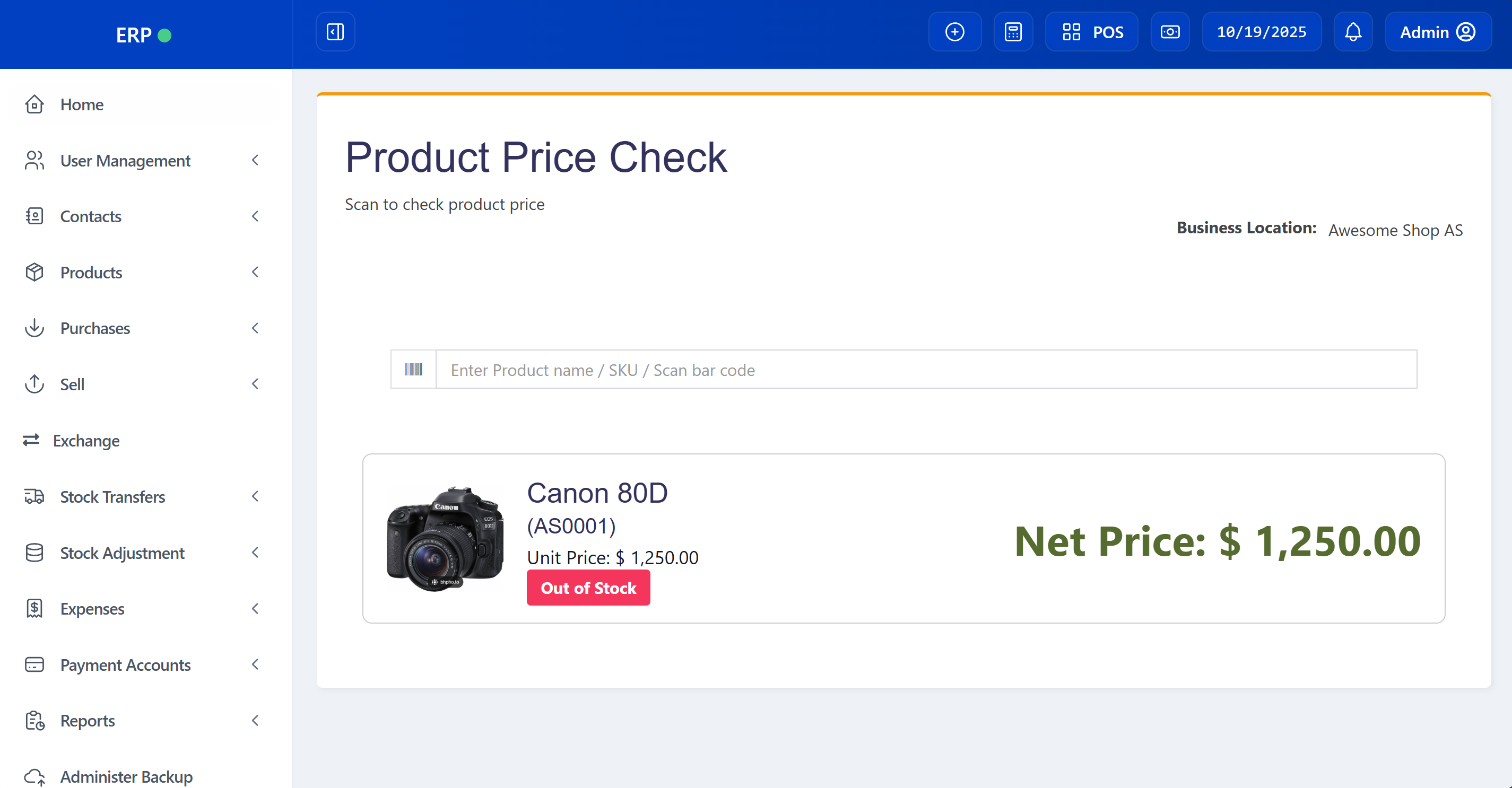
This guide will help you implement a dedicated price check system that allows store staff to quickly scan products and view pricing and stock information without accessing the full POS system.
Features
- ✅ Dedicated price check page with clean interface
- ✅ Two layout modes: Standard (with navigation) or Minimal (kiosk mode)
- ✅ Barcode scanning with camera support
- ✅ Real-time product search with autocomplete
- ✅ Display product image, name, SKU, and pricing
- ✅ Stock availability indicator
- ✅ Multi-location support
- ✅ Mobile-responsive design
- ✅ Multi-language translation support
- ✅ Back camera preference for mobile devices
- ✅ Full-screen kiosk mode for dedicated terminals
🚀 Quick Start
Prerequisites
- Ultimate POS system (Laravel 9)
- HTTPS connection (required for camera access)
- Modern browser with camera support
Dependencies
- jQuery (included in Ultimate POS)
- jQuery UI Autocomplete (included in Ultimate POS)
- Html5Qrcode library (v2.3.8)
- Bootstrap 3 (included in Ultimate POS)
📁 File Structure
├── app/Http/Controllers/
│   └── SellPosController.php               # Price check controller methods
├── routes/
│   └── web.php                              # Price check routes
├── resources/views/
│   ├── layouts/
│   │   └── minimal.blade.php                # Minimal layout (optional, for kiosk mode)
│   └── sale_pos/
│       ├── price_check.blade.php            # Main price check page
│       └── partials/
│           └── price_check_product_card.blade.php  # Product display card
├── public/js/
│   └── price-check.js                       # Price check JavaScript
└── lang/*/
    └── lang_v1.php                          # Translation keys
🎯 Layout Options
The price check page can be displayed in two different layouts depending on your use case:
Option 1: Standard Layout (with Sidebar & Header)
Use @extends('layouts.app') for the standard Ultimate POS layout that includes:
- ✅ Sidebar navigation menu
- ✅ Top header with user menu
- ✅ Standard admin interface
- ✅ Best for: Internal staff access from within the POS system
When to use: When the price check is accessed by logged-in staff who need access to other POS features.
Option 2: Minimal Layout (Full-Screen Kiosk Mode)
Use @extends('layouts.minimal') for a clean, full-screen interface that includes:
- ✅ No sidebar or header navigation
- ✅ Maximum screen space for content
- ✅ Kiosk-style interface
- ✅ Best for: Dedicated price-check stations, tablets, or customer-facing displays
When to use:
- Dedicated price-check terminals
- Tablets mounted in the store
- Customer self-service kiosks
- Public-facing price check displays
- When you want to hide navigation controls
Setting Up Minimal Layout
- Create the minimal layout file
resources/views/layouts/minimal.blade.php:
<!DOCTYPE html>
<html lang="{{ app()->getLocale() }}">
<head>
    <meta charset="utf-8">
    <meta http-equiv="X-UA-Compatible" content="IE=edge">
    <meta content="width=device-width, initial-scale=1, maximum-scale=1, user-scalable=no" name="viewport">
    <meta name="csrf-token" content="{{ csrf_token() }}">

    <title>@yield('title') - {{ config('app.name', 'POS') }}</title>

    <link rel="stylesheet" href="{{ asset('css/vendor.css?v='.$asset_v) }}">
    <link rel="stylesheet" href="{{ asset('css/app.css?v='.$asset_v) }}">

    @yield('css')
</head>

<body>
    @if (session('status'))
        <input type="hidden" id="status_span" data-status="{{ session('status.success') }}" data-msg="{{ session('status.msg') }}">
    @endif

    @yield('content')

    <script src="{{ asset('js/vendor.js?v=' . $asset_v) }}"></script>
    <script src="{{ asset('js/functions.js?v=' . $asset_v) }}"></script>

    @yield('javascript')
</body>
</html>
- Update price_check.blade.php to use minimal layout:
Change the first line from:
@extends('layouts.app')
To:
@extends('layouts.minimal')
That's it! Your price check page will now display in full-screen mode without navigation.
🛠️ Step 1: Add Routes
Add these routes to routes/web.php before the resource route for POS:
// Price Check Routes - Add BEFORE Route::resource('pos', ...)
Route::get('/price-check', [SellPosController::class, 'priceCheck'])
    ->name('pos.price_check');

Route::get('/price-check/get_product_row/{variation_id}/{location_id}',
    [SellPosController::class, 'getPriceCheckProductRow'])
    ->name('pos.get_price_check_product_row');
Important: These routes must be placed before Route::resource('pos', ...) to avoid route conflicts.
🛠️ Step 2: Add Controller Methods
Add these methods to app/Http/Controllers/SellPosController.php:
/**
 * Display price check page
 */
public function priceCheck()
{
    $business_id = request()->session()->get('user.business_id');

    if (!auth()->user()->can('superadmin') && !auth()->user()->can('sell.view')) {
        abort(403, 'Unauthorized action.');
    }

    $business_locations = BusinessLocation::forDropdown($business_id);
    $default_location = null;

    if (count($business_locations) == 1) {
        foreach ($business_locations as $id => $name) {
            $default_location = $id;
        }
    }

    return view('sale_pos.price_check')
        ->with(compact('business_locations', 'default_location'));
}

/**
 * Get product details for price check
 */
public function getPriceCheckProductRow($variation_id, $location_id)
{
    try {
        $business_id = request()->session()->get('user.business_id');

        $product = $this->productUtil->getDetailsFromVariation(
            $variation_id,
            $business_id,
            $location_id,
            false
        );

        $selling_price = $product->sell_price_inc_tax ?? $product->default_sell_price;

        $product_image = !empty($product->product_image)
            ? asset('uploads/img/' . $product->product_image)
            : asset('img/default.png');

        $product_data = [
            'product_name' => $product->product_name,
            'sub_sku' => $product->sub_sku,
            'selling_price' => $this->productUtil->num_f($selling_price, true),
            'qty_available' => $product->qty_available ?? 0,
            'enable_stock' => $product->enable_stock,
            'product_image' => $product_image,
            'unit' => $product->unit ?? ''
        ];

        $html = view('sale_pos.partials.price_check_product_card',
            compact('product_data'))->render();

        return response()->json([
            'success' => true,
            'html_content' => $html
        ]);

    } catch (\Exception $e) {
        return response()->json([
            'success' => false,
            'msg' => 'Error loading product details'
        ]);
    }
}
🛠️ Step 3: Create Main View
Create resources/views/sale_pos/price_check.blade.php:
Note: Choose either
@extends('layouts.app')for standard layout or@extends('layouts.minimal')for kiosk mode. See Layout Options section above.
@extends('layouts.minimal') {{-- or 'layouts.app' for standard layout --}}
@section('title', __('lang_v1.product_price_check'))
@section('css')
<style>
.card-wrapper {
height: calc(100vh - 40px);
width: auto !important;
margin: 20px !important;
}
.product-card {
display: flex;
align-items: center;
margin: 20px 0;
padding: 20px;
border: 1px solid #ccc;
border-radius: 8px;
background: #fff;
}
.product-image {
width: 112px;
height: 112px;
background-repeat: no-repeat;
background-position: center;
background-size: contain;
margin-right: 20px;
}
.product-info {
flex: 1;
}
.product-info h1 {
margin: 0;
font-size: 24px;
}
.product-info h3 {
margin: 5px 0;
font-size: 18px;
}
.product-info p {
margin: 5px 0;
font-size: 16px;
}
.heading {
font-size: 24px;
margin: 5px;
}
.price {
font-size: 24px;
margin: 5px;
}
.price-bottom {
font-size: 36px;
font-weight: bold;
color: darkolivegreen;
text-align: left;
}
.location-group {
display: flex;
align-items: center;
}
.location-label {
margin-right: 10px;
font-weight: bold;
}
.location-select .form-control {
display: inline-block;
width: auto;
vertical-align: middle;
}
@media (max-width: 768px) {
.main-container {
padding: 0 !important;
margin: 0 !important;
}
.card-wrapper {
padding: 10px !important;
height: auto;
width: 100% !important;
margin: 0 !important;
}
.box-header {
padding: 15px 10px !important;
}
.box-body {
padding: 10px !important;
}
.overview-filter {
padding: 0 !important;
}
.title h1 {
font-size: 28px !important;
margin: 10px 0 5px 0 !important;
}
.title p {
font-size: 14px !important;
margin: 5px 0 !important;
}
.product-card {
flex-direction: column;
align-items: center;
text-align: center;
margin: 10px 0 !important;
padding: 15px !important;
}
.product-image {
margin-bottom: 15px;
margin-right: 0 !important;
width: 80px;
height: 80px;
}
.price-bottom {
text-align: center;
font-size: 24px;
margin-top: 10px;
}
.heading {
font-size: 20px !important;
}
.price {
font-size: 16px !important;
}
.location-group {
flex-direction: column;
align-items: center;
text-align: center;
}
.location-label {
margin: 5px 0;
font-size: 14px !important;
}
.location-select {
width: 100%;
text-align: center;
}
.location-select .form-control {
width: 100%;
}
}
</style>
@endsection
@section('content')
<div class="main-container no-print">
<div class="card-wrapper">
<div class="box box-warning">
<div class="box-header">
<div class="overview-filter">
<div class="title">
<h1>@lang('lang_v1.product_price_check')</h1>
<p>@lang('lang_v1.scan_to_check_product_price')</p>
</div>
<div class="filter">
<div class="form-group location-group">
<label class="location-label">@lang('purchase.business_location'):</label>
<div class="location-select">
@if(count($business_locations) > 1)
<select class="form-control" id="select_location_id">
@foreach($business_locations as $id => $name)
<option value="{{ $id }}" {{ $id == $default_location ? 'selected' : '' }}>
{{ $name }}
</option>
@endforeach
</select>
@else
{{ $business_locations[$default_location] ?? '' }}
@endif
</div>
</div>
</div>
</div>
</div>
<div class="box-body">
<form>
<input id="location_id" name="location_id" type="hidden"
value="{{ $default_location }}">
<input id="product_row_count" type="hidden" value="0">
<div class="content">
<div class="row">
<div class="col-sm-12">
<div class="box-body">
<div class="form-group">
<div class="input-group">
<div class="input-group-btn">
<button type="button"
class="btn btn-default bg-white btn-flat"
id="camera_scan_btn"
title="@lang('lang_v1.scan_using_camera')">
<i class="fa fa-barcode"></i>
</button>
</div>
<input class="form-control"
id="search_product"
placeholder="@lang('lang_v1.search_product_placeholder')"
autofocus
name="search_product"
type="text"
value="">
</div>
</div>
</div>
<div class="row">
<div id="product-details" class="col-sm-12">
<!-- Product details will be inserted here by JavaScript -->
</div>
</div>
</div>
</div>
</div>
</form>
</div>
</div>
</div>
</div>
<!-- Camera Scanner Modal -->
<div class="modal fade" id="camera_scan_modal" tabindex="-1" role="dialog">
<div class="modal-dialog" role="document">
<div class="modal-content">
<div class="modal-header">
<button type="button" class="close" data-dismiss="modal" aria-label="Close">
<span aria-hidden="true">×</span>
</button>
<h4 class="modal-title">@lang('lang_v1.scan_barcode')</h4>
</div>
<div class="modal-body">
<div id="camera_reader" style="width: 100%;"></div>
<div id="camera_scan_result" class="text-center"
style="margin-top: 10px; display: none;">
<div class="alert alert-success">
<strong>@lang('lang_v1.scanned'):</strong>
<span id="scanned_barcode"></span>
</div>
</div>
</div>
<div class="modal-footer">
<button type="button" class="btn btn-default" data-dismiss="modal">
@lang('messages.close')
</button>
</div>
</div>
</div>
</div>
@endsection
@section('javascript')
<!-- html5-qrcode library for camera scanning -->
<script src="https://unpkg.com/html5-qrcode@2.3.8/html5-qrcode.min.js"></script>
<script src="{{ asset('js/price-check.js?v=' . $asset_v) }}"></script>
@endsection
🛠️ Step 4: Create Product Card Partial
Create resources/views/sale_pos/partials/price_check_product_card.blade.php:
<div class="product-card">
    <div class="product-image"
         style="background-image: url('{{ $product_data['product_image'] }}');"></div>
    <div class="product-info">
        <h1 class="heading">{{ $product_data['product_name'] }}</h1>
        <h3>({{ $product_data['sub_sku'] }})</h3>
        <p class="price">@lang('sale.unit_price'): {{ $product_data['selling_price'] }}</p>
        @if($product_data['enable_stock'] == 1)
            @if($product_data['qty_available'] <= 0)
                <span class="label label-danger" style="font-size: 14px; padding: 6px 12px;">
                    @lang('lang_v1.out_of_stock')
                </span>
            @else
                <span class="label label-success" style="font-size: 14px; padding: 6px 12px;">
                    @lang('report.in_stock'):
                    {{ number_format($product_data['qty_available'], 2) }}
                    {{ $product_data['unit'] }}
                </span>
            @endif
        @endif
    </div>
    <div class="price-bottom">
        @lang('lang_v1.net_price'): {{ $product_data['selling_price'] }}
    </div>
</div>
🛠️ Step 5: Create JavaScript File
Create public/js/price-check.js:
$(document).ready(function() {

    // Function to load product row
    function price_check_product_row(variation_id) {
        $('input#search_product').val('').focus();
        $('#product-details').empty();

        var product_row = $('input#product_row_count').val();
        var location_id = $('input#location_id').val();

        $.ajax({
            method: 'GET',
            url: '/price-check/get_product_row/' + variation_id + '/' + location_id,
            async: false,
            data: {
                product_row: product_row,
            },
            dataType: 'json',
            success: function(result) {
                if (result.success) {
                    $('#product-details').html(result.html_content);
                    $('input#product_row_count').val(parseInt(product_row) + 1);
                    $('input#search_product').focus().select();
                } else {
                    toastr.error(result.msg);
                    $('input#search_product').focus().select();
                }
            },
            error: function() {
                toastr.error('Error loading product details');
                $('input#search_product').focus().select();
            }
        });
    }

    // Product autocomplete search
    if ($('#search_product').length) {
        $('#search_product')
            .autocomplete({
                delay: 1000,
                source: function(request, response) {
                    var search_fields = [];
                    $('.search_fields:checked').each(function(i) {
                        search_fields[i] = $(this).val();
                    });

                    $.getJSON(
                        '/products/list',
                        {
                            location_id: $('input#location_id').val(),
                            term: request.term,
                            not_for_selling: 0,
                            search_fields: search_fields
                        },
                        response
                    );
                },
                minLength: 2,
                response: function(event, ui) {
                    if (ui.content.length === 1) {
                        var item = ui.content[0];
                        // Auto-select single result
                        price_check_product_row(item.variation_id);
                        $(this).autocomplete('close');
                    } else if (ui.content.length == 0) {
                        toastr.error(LANG.no_products_found || 'No products found');
                        $('input#search_product').select();
                    }
                },
                focus: function(event, ui) {
                    if (ui.item.qty_available <= 0) {
                        return false;
                    }
                },
                select: function(event, ui) {
                    var searched_term = $(this).val();
                    $(this).val(null);
                    var purchase_line_id = ui.item.purchase_line_id &&
                        searched_term == ui.item.lot_number ?
                        ui.item.purchase_line_id : null;
                    price_check_product_row(ui.item.variation_id, purchase_line_id);
                },
            })
            .autocomplete('instance')._renderItem = function(ul, item) {
                var string = '<div>' + item.name;
                if (item.type == 'variable') {
                    string += '-' + item.variation;
                }

                var selling_price = item.selling_price;
                if (item.variation_group_price) {
                    selling_price = item.variation_group_price;
                }

                string += ' (' + item.sub_sku + ')' + '<br> Price: ';
                if (typeof __currency_trans_from_en === 'function') {
                    string += __currency_trans_from_en(selling_price,
                        false, false, __currency_precision, true);
                } else {
                    string += selling_price;
                }

                if (item.enable_stock == 1) {
                    var qty_available = item.qty_available;
                    if (typeof __currency_trans_from_en === 'function') {
                        qty_available = __currency_trans_from_en(
                            item.qty_available, false, false,
                            __currency_precision, true);
                    }
                    string += ' - ' + qty_available + item.unit;
                }
                string += '</div>';

                return $('<li>')
                    .append(string)
                    .appendTo(ul);
            };
    }

    // Handle location change
    $('#select_location_id').on('change', function() {
        var selectedLocationId = $(this).val();
        $('#location_id').val(selectedLocationId);
        $('#product-details').empty();
        $('input#search_product').val('').focus();
    });

    // Responsive layout adjustment
    function checkWidth() {
        if ($(window).width() < 768) {
            $('.location-group').removeClass('pull-right');
        } else {
            $('.location-group').addClass('pull-right');
        }
    }

    checkWidth();
    $(window).resize(function() {
        checkWidth();
    });

    // Auto-focus search input
    $('input#search_product').select();

    // Camera Scanner functionality
    var html5QrcodeScanner = null;

    $('#camera_scan_btn').on('click', function() {
        $('#camera_scan_modal').modal('show');
        startCameraScanner();
    });

    $('#camera_scan_modal').on('hidden.bs.modal', function() {
        stopCameraScanner();
    });

    function startCameraScanner() {
        if (html5QrcodeScanner) {
            return; // Already running
        }

        // Configuration for camera scanner
        var config = {
            fps: 10,
            qrbox: { width: 250, height: 250 },
            aspectRatio: 1.0,
            // Force back camera (environment facing) for mobile
            videoConstraints: {
                facingMode: { exact: "environment" }
            }
        };

        html5QrcodeScanner = new Html5QrcodeScanner(
            "camera_reader",
            config,
            false // verbose
        );

        html5QrcodeScanner.render(onScanSuccess, onScanError);
    }

    function stopCameraScanner() {
        if (html5QrcodeScanner) {
            html5QrcodeScanner.clear().then(function() {
                html5QrcodeScanner = null;
                $('#camera_scan_result').hide();
            }).catch(function(error) {
                console.error('Failed to clear scanner:', error);
            });
        }
    }

    function onScanSuccess(decodedText, decodedResult) {
        // Display scanned result
        $('#scanned_barcode').text(decodedText);
        $('#camera_scan_result').show();

        // Put scanned value in search input
        $('#search_product').val(decodedText);

        // Trigger search
        setTimeout(function() {
            $('#search_product').trigger('focus');
            $('#search_product').autocomplete('search', decodedText);
            $('#camera_scan_modal').modal('hide');
        }, 500);
    }

    function onScanError(errorMessage) {
        // Ignore scan errors (happens when no barcode is in view)
        // console.log(errorMessage);
    }
});
🛠️ Step 6: Add Translation Keys
Add these keys to lang/*/lang_v1.php for all language files:
'product_price_check' => 'Product Price Check',
'scan_to_check_product_price' => 'Scan to check product price',
'out_of_stock' => 'Out of Stock',
'scan_using_camera' => 'Scan using camera',
'scan_barcode' => 'Scan Barcode',
'scanned' => 'Scanned',
🧪 Testing
-
Navigate to Price Check Page
https://yourdomain.com/price-check -
Test Manual Search
- Type product name or SKU in search box
- Select from autocomplete results
- Verify product details display correctly
-
Test Barcode Scanning
- Click barcode icon button
- Allow camera access
- Scan a product barcode
- Verify automatic product lookup
-
Test Location Switching
- Change location dropdown (if multiple locations)
- Search for product again
- Verify stock shows for selected location
-
Test Mobile Responsiveness
- Open on mobile device
- Verify layout adapts properly
- Test barcode camera on mobile
🎨 Customization
Change Image Size
In price_check.blade.php, modify the CSS:
.product-image {
    width: 150px;  /* Change from 112px */
    height: 150px; /* Change from 112px */
}
Change Price Color
Modify .price-bottom color:
.price-bottom {
    color: #ff6b6b; /* Change from darkolivegreen */
}
Add Additional Product Information
In price_check_product_card.blade.php, add more fields:
<p>Category: {{ $product_data['category'] }}</p>
<p>Brand: {{ $product_data['brand'] }}</p>
🔒 Permissions
The price check page respects Ultimate POS permissions:
- Requires
sell.viewpermission or superadmin access - Inherits location-based access restrictions
- Uses business-specific data only
🐛 Troubleshooting
Camera Not Working
Issue: Camera button doesn't activate camera
Solution:
- Ensure HTTPS is enabled (HTTP blocks camera access)
- Check browser permissions for camera
- Verify html5-qrcode library loaded correctly
Products Not Found
Issue: Search returns no results
Solution:
- Verify route is before resource route in
web.php - Check location is selected correctly
- Ensure products exist in selected location
Autocomplete Not Working
Issue: Search doesn't show suggestions
Solution:
- Verify jQuery UI is loaded
- Check
/products/listendpoint is accessible - Open browser console for JavaScript errors
📱 Mobile Optimization
The price check system is fully mobile-optimized:
- Touch-friendly: Large buttons and inputs
- Responsive layout: Adapts to screen size
- Back camera default: Mobile devices use rear camera
- Full viewport: Maximizes available screen space
- Vertical product cards: Better mobile viewing
🌐 Multi-Language Support
All UI text uses Laravel's translation system:
@lang('lang_v1.product_price_check')
@lang('lang_v1.scan_to_check_product_price')
@lang('lang_v1.out_of_stock')
Add translations in your language files to support different locales.
⚡ Performance Tips
-
Cache Product Images
- Store images in CDN for faster loading
- Use optimized image sizes
-
Autocomplete Delay
- Current delay: 1000ms
- Reduce for faster response (min 500ms recommended)
-
AJAX Caching
- Consider caching frequently searched products
- Use service workers for offline capability
🔗 Related Features
- Camera Barcode Scanner - Universal barcode scanning
- POS System - Full point of sale functionality
- Stock Management - Inventory tracking
📝 Summary
You've successfully implemented a standalone product price check system with:
✅ Clean, dedicated price check interface ✅ Two layout options (standard or kiosk mode) ✅ Barcode scanning with camera support ✅ Real-time product search ✅ Mobile-responsive design ✅ Multi-location support ✅ Full translation support ✅ Full-screen kiosk mode for dedicated terminals
The system provides a professional, easy-to-use tool for store staff to quickly check product prices and availability. Use the standard layout for integrated access or the minimal layout for dedicated price-check stations and kiosk displays.
💡 Next Steps
Consider adding these enhancements:
- Printer Integration: Quick price label printing
- History Tracking: Log of recent price checks
- Favorites: Quick access to frequently checked products
- Offline Mode: Cache products for offline use
- QR Code Support: Enhanced barcode format support
Created for Ultimate POS - Professional retail management solution
💛 Support this project