Delete Invoice Password Protection
This guide walks you through implementing password protection for deleting invoices in UltimatePOS. When enabled, users must enter a password before they can delete any invoice.
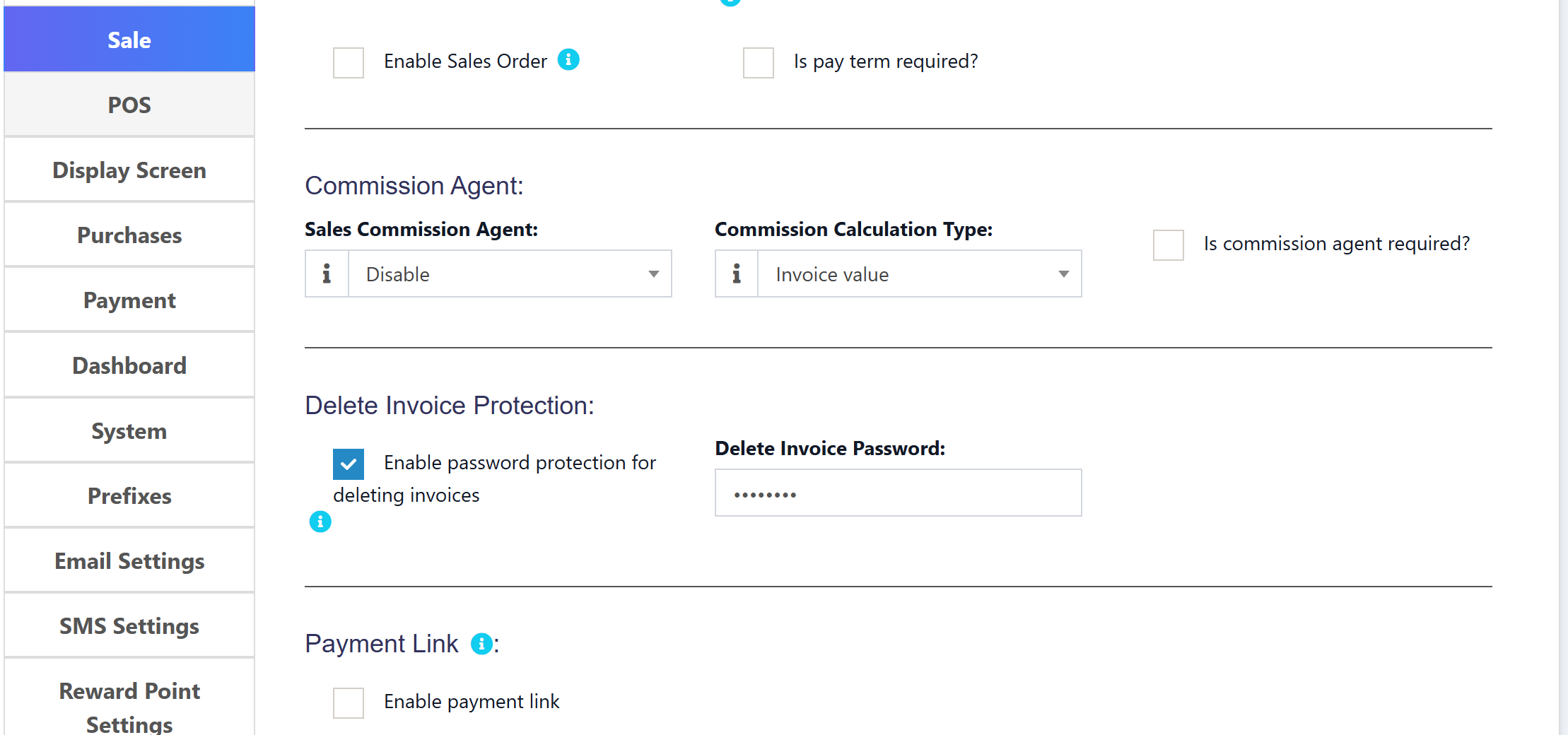
Overview
We'll add:
- Password protection toggle in Business Settings
- Password field in Business Settings (Sales tab)
- Password prompt when deleting invoices
- Server-side password verification
Features
- Enable/disable password protection from Business Settings
- Set a custom password for invoice deletion
- Password prompt appears before any invoice deletion
- Works on all pages (Sells list, POS recent transactions, etc.)
Step 1: Add Language Translations
1.1 Update English Language File
File: lang/en/lang_v1.php
Add these translations before the closing ];:
'delete_invoice_protection' => 'Delete Invoice Protection',
'enable_delete_invoice_password' => 'Enable password protection for deleting invoices',
'enable_delete_invoice_password_help' => 'When enabled, users must enter a password before deleting any invoice',
'delete_invoice_password' => 'Delete Invoice Password',
'delete_invoice_password_placeholder' => 'Enter password for delete protection',
'enter_delete_password' => 'Enter Delete Password',
'enter_password_to_delete' => 'Please enter the password to delete this invoice',
'incorrect_delete_password' => 'Incorrect password. Invoice cannot be deleted.',
1.2 Update JavaScript Language File
File: public/js/lang/en.js
Add these translations before the closing };:
'enter_delete_password': 'Enter Delete Password',
'enter_password_to_delete': 'Please enter the password to delete this invoice',
'incorrect_delete_password': 'Incorrect password. Invoice cannot be deleted.',
'password_required': 'Password is required',
Step 2: Add Settings UI
2.1 Update Sales Settings Partial
File: resources/views/business/partials/settings_sales.blade.php
Add the following section before the Payment Link section (search for payment_link):
</div>
<hr>
<div class="row">
    <div class="col-md-12"><h4>@lang('lang_v1.delete_invoice_protection'):</h4></div>
    <div class="col-sm-4">
        <div class="form-group">
            <div class="checkbox">
                <label>
                {!! Form::checkbox('pos_settings[enable_delete_invoice_password]', 1, !empty($pos_settings['enable_delete_invoice_password']) , [ 'class' => 'input-icheck', 'id' => 'enable_delete_invoice_password']); !!} {{ __( 'lang_v1.enable_delete_invoice_password' ) }}
                </label>
                @show_tooltip(__('lang_v1.enable_delete_invoice_password_help'))
            </div>
        </div>
    </div>
    <div class="col-sm-4">
        <div class="form-group">
            {!! Form::label('delete_invoice_password', __('lang_v1.delete_invoice_password') . ':') !!}
            <input type="password" name="pos_settings[delete_invoice_password]"
                   value="{{ $pos_settings['delete_invoice_password'] ?? '' }}"
                   class="form-control" id="delete_invoice_password"
                   placeholder="{{ __('lang_v1.delete_invoice_password_placeholder') }}">
        </div>
    </div>
</div>
<hr>
<div class="row">
    <div class="col-md-12"><h4>@lang('lang_v1.payment_link') @show_tooltip(__('lang_v1.payment_link_help_text')):</h4></div>
Note: This adds the settings in the Sales tab of Business Settings, after the Commission Agent section and before the Payment Link section.
Step 3: Pass Setting to JavaScript
3.1 Update JavaScript Partial
File: resources/views/layouts/partials/javascripts.blade.php
Find the opening <script> section where APP object is defined and update it:
<script type="text/javascript">
    base_path = "{{ url('/') }}";
    //used for push notification
    APP = {};
    APP.PUSHER_APP_KEY = '{{ config('broadcasting.connections.pusher.key') }}';
    APP.PUSHER_APP_CLUSTER = '{{ config('broadcasting.connections.pusher.options.cluster') }}';
    APP.INVOICE_SCHEME_SEPARATOR = '{{ config('constants.invoice_scheme_separator') }}';
    //variable from app service provider
    APP.PUSHER_ENABLED = '{{ $__is_pusher_enabled }}';
    @auth
    @php
        $user = Auth::user();
        $pos_settings_json = session('business.pos_settings');
        $pos_settings_arr = !empty($pos_settings_json) ? json_decode($pos_settings_json, true) : [];
    @endphp
    APP.USER_ID = "{{ $user->id }}";
    APP.DELETE_INVOICE_PASSWORD = {{ !empty($pos_settings_arr['enable_delete_invoice_password']) ? 'true' : 'false' }};
    @else
        APP.USER_ID = '';
        APP.DELETE_INVOICE_PASSWORD = false;
    @endauth
</script>
Key Changes:
- Added
$pos_settings_jsonand$pos_settings_arrvariables inside the@authblock - Added
APP.DELETE_INVOICE_PASSWORDboolean variable
Step 4: Update JavaScript Delete Handler
4.1 Update Delete Sale Handler
File: public/js/app.js
Find the //Delete Sale section and replace it with:
//Delete Sale
$(document).on('click', '.delete-sale', function(e) {
    e.preventDefault();
    var href = $(this).attr('href');
    var is_suspended = $(this).hasClass('is_suspended');
    var enable_delete_password = (typeof APP !== 'undefined' && APP.DELETE_INVOICE_PASSWORD === true);

    // Function to perform the actual delete
    function performDelete(password) {
        var ajaxData = {};
        if (password) {
            ajaxData.delete_invoice_password = password;
        }
        $.ajax({
            method: 'DELETE',
            url: href,
            data: ajaxData,
            dataType: 'json',
            success: function(result) {
                if (result.success == true) {
                    toastr.success(result.msg);
                    if (typeof sell_table !== 'undefined') {
                        sell_table.ajax.reload();
                    }
                    if (typeof pending_repair_table !== 'undefined') {
                        pending_repair_table.ajax.reload();
                    }
                    //Displays list of recent transactions
                    if (typeof get_recent_transactions !== 'undefined') {
                        get_recent_transactions('final', $('div#tab_final'));
                        get_recent_transactions('draft', $('div#tab_draft'));
                    }
                    if (is_suspended) {
                        $('.view_modal').modal('hide');
                    }
                } else {
                    toastr.error(result.msg);
                }
            },
        });
    }

    if (enable_delete_password) {
        // Use native prompt to avoid DataTable interference
        var password = prompt(LANG.enter_password_to_delete);
        if (password === null) {
            return;
        }
        if (!password || password.trim() === '') {
            toastr.error(LANG.password_required);
            return;
        }
        performDelete(password);
    } else {
        swal({
            title: LANG.sure,
            icon: 'warning',
            buttons: true,
            dangerMode: true,
        }).then(willDelete => {
            if (willDelete) {
                performDelete(null);
            }
        });
    }
});
Key Changes:
- Checks
APP.DELETE_INVOICE_PASSWORDto determine if password protection is enabled - Shows a password prompt when enabled
- Sends password with the delete request for server-side verification
- Falls back to regular confirmation when disabled
Step 5: Hash Password When Saving
5.1 Update BusinessController
File: app/Http/Controllers/BusinessController.php
Find the postBusinessSettings method and add password hashing after the default pos_settings loop (search for // Save pos_settings as JSON):
$default_pos_settings = $this->businessUtil->defaultPosSettings();
foreach ($default_pos_settings as $key => $value) {
    if (! isset($pos_settings[$key])) {
        $pos_settings[$key] = $value;
    }
}

// Hash delete invoice password if provided
if (!empty($pos_settings['delete_invoice_password'])) {
    // Only hash if it's a new password (not already hashed)
    $existing_password = $pre_pos_setting['delete_invoice_password'] ?? '';
    if ($pos_settings['delete_invoice_password'] !== $existing_password) {
        $pos_settings['delete_invoice_password'] = \Hash::make($pos_settings['delete_invoice_password']);
    }
}

// Save pos_settings as JSON
$business_details['pos_settings'] = json_encode($pos_settings);
Key Changes:
- Password is hashed using
\Hash::make()before saving - Only hashes if the password is new/changed (avoids double-hashing)
Step 6: Update Controller for Password Verification
6.1 Update SellPosController Destroy Method
File: app/Http/Controllers/SellPosController.php
Find the destroy method and update it:
/**
 * Remove the specified resource from storage.
 *
 * @param  int  $id
 * @return \Illuminate\Http\Response
 */
public function destroy($id)
{
    if (!auth()->user()->can('sell.delete') && !auth()->user()->can('direct_sell.delete') && !auth()->user()->can('so.delete')) {
        abort(403, 'Unauthorized action.');
    }

    if (request()->ajax()) {
        try {
            $business_id = request()->session()->get('user.business_id');

            // Check if delete invoice password protection is enabled
            $business = Business::find($business_id);
            $pos_settings = !empty($business->pos_settings) ? json_decode($business->pos_settings, true) : [];

            if (!empty($pos_settings['enable_delete_invoice_password'])) {
                $stored_password = $pos_settings['delete_invoice_password'] ?? '';
                $entered_password = request()->input('delete_invoice_password');

                if (empty($entered_password) || !\Hash::check($entered_password, $stored_password)) {
                    return [
                        'success' => false,
                        'msg' => trans('lang_v1.incorrect_delete_password')
                    ];
                }
            }

            //Begin transaction
            DB::beginTransaction();

            $output = $this->transactionUtil->deleteSale($business_id, $id);

            DB::commit();
        } catch (\Exception $e) {
            DB::rollBack();
            \Log::emergency('File:' . $e->getFile() . 'Line:' . $e->getLine() . 'Message:' . $e->getMessage());

            $output['success'] = false;
            $output['msg'] = trans('messages.something_went_wrong');
        }

        return $output;
    }
}
Key Changes:
- Uses
\Hash::check()to verify the entered password against the hashed password - Secure password verification without exposing the actual password
How to Use
- Go to Settings → Business Settings
- Click on the Sale tab
- Find the Delete Invoice Protection section
- Check "Enable password protection for deleting invoices"
- Enter your desired password in the password field
- Click "Update Settings"
Now when any user tries to delete an invoice:
- A password prompt will appear
- User must enter the correct password
- If incorrect, the deletion is blocked with an error message
Important Notes
-
Password Security: The password is securely hashed using bcrypt (
\Hash::make()) before storing. Verification uses\Hash::check()which is the same method Laravel uses for user passwords. -
Session Refresh: After changing settings, users may need to log out and log back in for changes to take effect immediately.
-
Works Everywhere: This protection works on:
- Sells list page (
/sells) - POS recent transactions
- Suspended sales modal
- Sales orders
- Quotations/Drafts
- Sells list page (
-
Permission Check: The password protection is an additional layer on top of existing permission checks (
sell.delete,direct_sell.delete,so.delete). -
Who Can Change Password: Only users with
business_settings.accesspermission can view and modify the delete invoice password settings.
Troubleshooting
Password prompt not appearing
- Clear browser cache
- Log out and log back in
- Check that
APP.DELETE_INVOICE_PASSWORDistruein browser console
Delete not working after entering password
- Check browser console for errors
- Verify the password matches exactly (case-sensitive)
- Check Laravel logs for any server errors
Settings not saving
- Ensure
pos_settingsfield exists inbusinesstable - Check that form is submitting correctly
💛 Support this project