Out of Stock Red Indicator in POS Implementation Guide
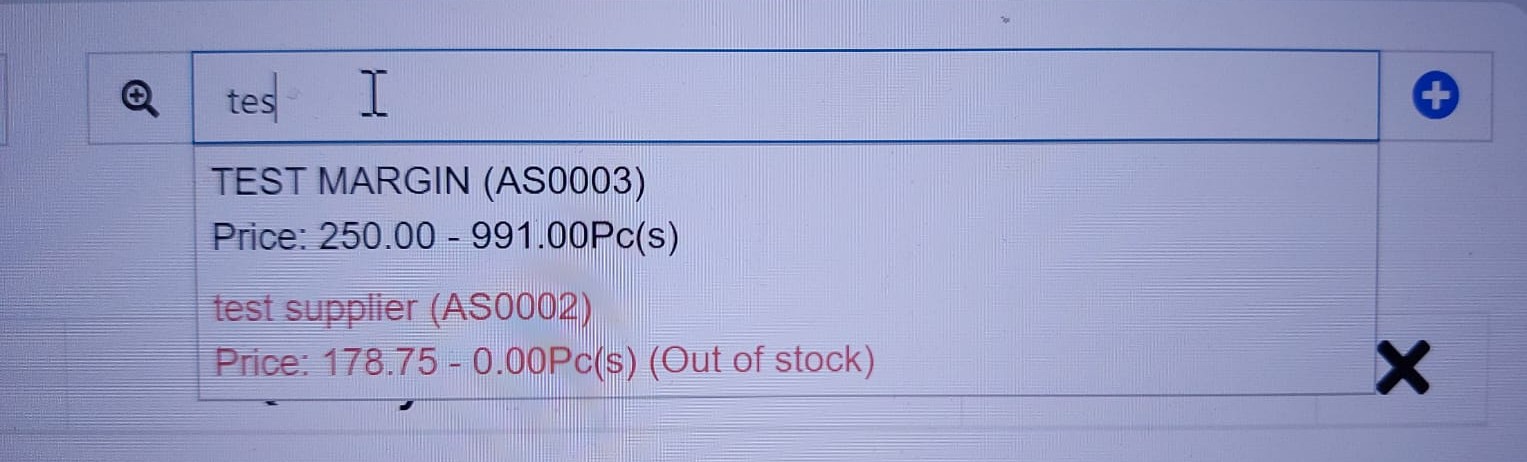
This guide shows how to add a visual red indicator for out-of-stock products in the POS product search when "Allow Overselling" is enabled. Instead of disabling out-of-stock products, they will be displayed with light red text to alert users while still allowing selection.
The Problem
In Ultimate POS, when searching for products in the POS screen:
- If Allow Overselling is disabled and stock is 0 or less: Product is shown as disabled/readonly with "(Out of stock)" text
- If Allow Overselling is enabled: Products with no stock appear exactly like products with stock - no visual distinction
This can lead to confusion as users cannot easily identify which products are out of stock when overselling is allowed.
The Solution
This implementation adds visual feedback for out-of-stock products when overselling is enabled:
- Products with stock
<= 0are displayed in light red text - An additional "(Out of stock)" indicator is shown
- Products remain clickable and selectable (since overselling is allowed)
- Clear visual distinction between in-stock and out-of-stock products
Implementation Tree Structure
your-laravel-project/
└── public/
    └── js/
        └── pos.js                                      # 📝 MODIFY
Files Overview
| File | Action | Description |
|---|---|---|
pos.js | 📝 Modify | Update _renderItem function in autocomplete handler |
Features
- ✅ Light red text color for out-of-stock products when overselling is enabled
- ✅ "(Out of stock)" indicator displayed alongside stock quantity
- ✅ Products remain selectable (not disabled)
- ✅ Works with variable products
- ✅ Works with quotations and drafts
- ✅ No impact on products with available stock
- ✅ Respects existing overselling settings
Prerequisites
- Ultimate POS with working POS functionality
- "Allow Overselling" setting accessible in POS settings
- jQuery and existing POS JavaScript files
Implementation Steps
Step 1: Update the Autocomplete Render Function in pos.js
Update the _renderItem function in public/js/pos.js to add the red indicator for out-of-stock products.
Find this section (around line 288 in the _renderItem function):
} else {
    var string = '<div>' + item.name;
    if (item.type == 'variable') {
        string += '-' + item.variation;
    }

    var selling_price = item.selling_price;
    if (item.variation_group_price) {
        selling_price = item.variation_group_price;
    }

    string += ' (' + item.sub_sku + ')' + '<br> Price: ' + __currency_trans_from_en(selling_price, false, false, __currency_precision, true);
    if (item.enable_stock == 1) {
        var qty_available = __currency_trans_from_en(item.qty_available, false, false, __currency_precision, true);
        string += ' - ' + qty_available + item.unit;
    }
    string += '</div>';

    return $('<li>')
        .append(string)
        .appendTo(ul);
}
Replace with:
} else {
    // Check if out of stock but overselling is allowed - show in light red
    var is_out_of_stock = item.enable_stock == 1 && item.qty_available <= 0;
    var text_style = (is_out_of_stock && is_overselling_allowed) ? 'color: #e57373;' : '';

    var string = '<div style="' + text_style + '">' + item.name;
    if (item.type == 'variable') {
        string += '-' + item.variation;
    }

    var selling_price = item.selling_price;
    if (item.variation_group_price) {
        selling_price = item.variation_group_price;
    }

    string += ' (' + item.sub_sku + ')' + '<br> Price: ' + __currency_trans_from_en(selling_price, false, false, __currency_precision, true);
    if (item.enable_stock == 1) {
        var qty_available = __currency_trans_from_en(item.qty_available, false, false, __currency_precision, true);
        string += ' - ' + qty_available + item.unit;
        // Add out of stock indicator when overselling is allowed
        if (is_out_of_stock && is_overselling_allowed) {
            string += ' <span style="color: #e57373;">(Out of stock)</span>';
        }
    }
    string += '</div>';

    return $('<li>')
        .append(string)
        .appendTo(ul);
}
Key changes:
- Added
is_out_of_stockvariable to check if product has no stock - Added
text_stylevariable that applies light red color when out of stock AND overselling is allowed - Applied style to the main
<div>element - Added "(Out of stock)" indicator span with matching red color
How It Works
The implementation leverages the existing is_overselling_allowed variable that is already defined in the _renderItem function:
var is_overselling_allowed = false;
if ($('input#is_overselling_allowed').length) {
    is_overselling_allowed = true;
}
Behavior Matrix
| Allow Overselling | Stock | Behavior |
|---|---|---|
| Disabled | ≤ 0 | Product disabled with "(Out of stock)" text |
| Enabled | ≤ 0 | Light red text + "(Out of stock)" (NEW) |
| Disabled | > 0 | Normal text, selectable |
| Enabled | > 0 | Normal text, selectable |
Color Choice
The color #e57373 is a light red (Material Design Red 300) that:
- Is clearly visible but not harsh on the eyes
- Provides sufficient contrast on white backgrounds
- Indicates warning/attention without being alarming
Verification Steps
After implementation, verify that:
- Enable "Allow Overselling" in your POS settings
- Search for a product that has 0 or negative stock
- Verify red indicator appears - product name and details should be light red
- Verify "(Out of stock)" text appears after the stock quantity
- Click on the product - it should be selectable (not disabled)
- Search for a product with stock - should appear in normal color
- Disable "Allow Overselling" - out-of-stock products should appear disabled (existing behavior)
Customization Options
Changing the Color
To use a different shade of red, modify the hex color value:
// Darker red
var text_style = (is_out_of_stock && is_overselling_allowed) ? 'color: #f44336;' : '';

// Lighter red
var text_style = (is_out_of_stock && is_overselling_allowed) ? 'color: #ef9a9a;' : '';

// Orange warning
var text_style = (is_out_of_stock && is_overselling_allowed) ? 'color: #ff9800;' : '';
Adding Bold Text
To make the text bold as well:
var text_style = (is_out_of_stock && is_overselling_allowed) ? 'color: #e57373; font-weight: bold;' : '';
Custom Out of Stock Message
To use a translation key instead of hardcoded text:
if (is_out_of_stock && is_overselling_allowed) {
    string += ' <span style="color: #e57373;">(' + LANG.out_of_stock + ')</span>';
}
Troubleshooting
Issue: Red color not appearing
Solutions:
- Verify "Allow Overselling" is enabled in POS settings
- Check that the product actually has stock
<= 0 - Clear browser cache and reload the POS page
- Check browser console for JavaScript errors
Issue: All products appearing in red
Solutions:
- Verify the condition checks both
is_out_of_stockANDis_overselling_allowed - Check that
item.qty_availableis being returned correctly from the API
Issue: Color appears too bright/dark
Solution: Adjust the hex color value. Common alternatives:
#e57373- Light red (default)#ef5350- Medium red#f44336- Standard red#ffcdd2- Very light red/pink
Browser Compatibility
This implementation uses standard CSS inline styles and is compatible with:
- Chrome (all versions)
- Firefox (all versions)
- Safari (all versions)
- Edge (all versions)
- Internet Explorer 11+
Performance Notes
- Minimal performance impact - only adds a simple condition check
- No additional API calls required
- Uses existing
is_overselling_allowedvariable - Styling applied via inline styles (no CSS file changes needed)
Conclusion
This implementation provides clear visual feedback for out-of-stock products when overselling is enabled, helping POS users quickly identify products with no available stock while still allowing them to complete sales when business rules permit overselling.
💛 Support this project