Stock by Location - Admin Product Index View
Overview
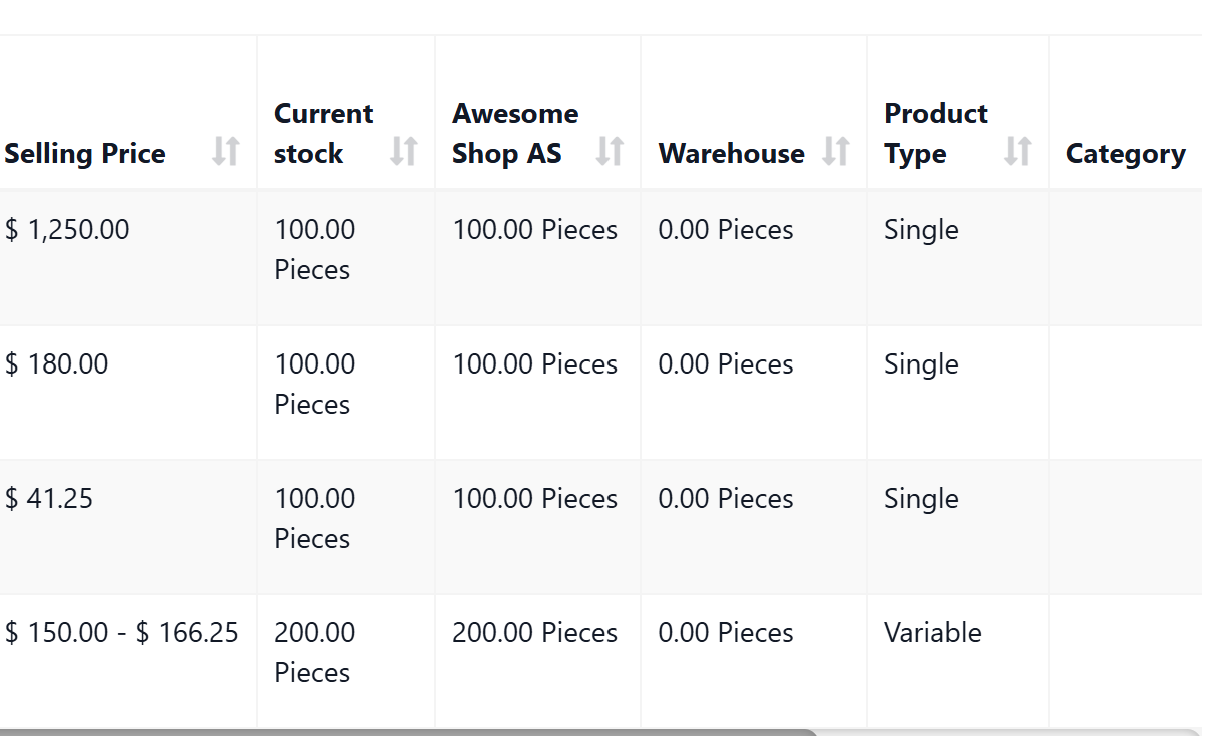
This guide will walk you through implementing location-specific stock columns in the product index page, visible only to admin users. This feature allows administrators to see stock quantities for each business location at a glance without needing to filter or navigate to different views.
📦 Download Starter Files
Download Implementation Template
Features
- ✅ Dynamic location-specific stock columns for admin users
- ✅ Displays individual stock quantities per location
- ✅ Automatically adapts to any number of business locations
- ✅ Hidden from non-admin users (maintains existing view)
- ✅ Uses efficient SQL conditional aggregation
- ✅ Shows stock with product units (e.g., "10 Pc", "5 Kg")
- ✅ Handles products without stock tracking ("--")
- ✅ Responsive DataTables integration
📋 When to Use This Feature
This feature is ideal when you need to:
- Monitor stock distribution across multiple locations quickly
- Identify stock imbalances between locations at a glance
- Make informed transfer decisions based on visual stock data
- Provide admin users with comprehensive stock visibility
- Maintain simplified views for regular staff
🚀 Quick Start
Prerequisites
- Ultimate POS system (Laravel 9+)
- Multiple business locations configured
- Admin user access
- Products with location-based stock enabled
📁 File Structure
├── app/Http/Controllers/
│   └── ProductController.php                # Main controller updates
├── resources/views/product/
│   ├── index.blade.php                      # DataTable column configuration
│   └── partials/
│       └── product_list.blade.php           # Table header updates
🛠️ Step 1: Update ProductController
File: app/Http/Controllers/ProductController.php
The controller handles both the query-level aggregation and the DataTables response formatting.
1.1 Add Location-Specific Stock Columns to Query
Location: Inside the index() method, around line 112-169
Replace the existing $products->select() section with:
// Get all business locations for admin users
$is_admin = $this->productUtil->is_admin(auth()->user());
$business_locations_list = [];
if ($is_admin) {
    $business_locations_list = BusinessLocation::where('business_id', $business_id)->Active()->get();
}

$select_columns = [
    'products.id',
    'products.name as product',
    'products.type',
    'c1.name as category',
    'c2.name as sub_category',
    'units.actual_name as unit',
    'brands.name as brand',
    'tax_rates.name as tax',
    'products.sku',
    'products.image',
    'products.enable_stock',
    'products.is_inactive',
    'products.not_for_selling',
    'products.product_custom_field1',
    'products.product_custom_field2',
    'products.product_custom_field3',
    'products.product_custom_field4',
    'products.product_custom_field5',
    'products.product_custom_field6',
    'products.product_custom_field7',
    'products.product_custom_field8',
    'products.product_custom_field9',
    'products.product_custom_field10',
    'products.product_custom_field11',
    'products.product_custom_field12',
    'products.product_custom_field13',
    'products.product_custom_field14',
    'products.product_custom_field15',
    'products.product_custom_field16',
    'products.product_custom_field17',
    'products.product_custom_field18',
    'products.product_custom_field19',
    'products.product_custom_field20',
    'products.alert_quantity',
    DB::raw('SUM(vld.qty_available) as current_stock'),
];

// Add location-specific stock columns for admin users
if ($is_admin) {
    foreach ($business_locations_list as $location) {
        $select_columns[] = DB::raw("SUM(CASE WHEN vld.location_id = {$location->id} THEN vld.qty_available ELSE 0 END) as location_stock_{$location->id}");
    }
}

$select_columns[] = DB::raw('MAX(v.sell_price_inc_tax) as max_price');
$select_columns[] = DB::raw('MIN(v.sell_price_inc_tax) as min_price');
$select_columns[] = DB::raw('MAX(v.dpp_inc_tax) as max_purchase_price');
$select_columns[] = DB::raw('MIN(v.dpp_inc_tax) as min_purchase_price');

$products = $query->select($select_columns);
Explanation:
- Uses SQL
CASE WHENto pivot location stock into separate columns - Only adds location columns when user is admin
- Dynamically generates columns based on active business locations
1.2 Add Location Stock Column Handlers
Location: After the editColumn('current_stock', ...) section, around line 309-336
Add this code after the current_stock column definition:
->editColumn('current_stock', function ($row) {
    if ($row->enable_stock) {
        $stock = $this->productUtil->num_f($row->current_stock, false, null, true);

        return $stock . ' ' . $row->unit;
    } else {
        return '--';
    }
});

// Add location stock columns for admin users
if ($is_admin) {
    foreach ($business_locations_list as $location) {
        $location_id = $location->id;
        $datatables = $datatables->addColumn(
            "location_stock_{$location_id}",
            function ($row) use ($location_id) {
                $column_name = "location_stock_{$location_id}";
                if ($row->enable_stock && isset($row->$column_name)) {
                    $stock = $this->productUtil->num_f($row->$column_name, false, null, true);
                    return $stock . ' ' . $row->unit;
                } else {
                    return '--';
                }
            }
        );
    }
}

$datatables = $datatables->addColumn(
    'purchase_price',
    '<div style="white-space: nowrap;">@format_currency($min_purchase_price) @if($max_purchase_price != $min_purchase_price && $type == "variable") -  @format_currency($max_purchase_price)@endif </div>'
)
1.3 Update rawColumns Array
Location: Before ->make(true), around line 352-371
Replace the existing rawColumns section with:
->setRowAttr([
    'data-href' => function ($row) {
        if (auth()->user()->can('product.view')) {
            return  action([\App\Http\Controllers\ProductController::class, 'view'], [$row->id]);
        } else {
            return '';
        }
    },
]);

// Add location stock columns to rawColumns for admin users
$raw_columns = ['action', 'image', 'mass_delete', 'product', 'selling_price', 'purchase_price', 'category', 'current_stock'];
if ($is_admin) {
    foreach ($business_locations_list as $location) {
        $raw_columns[] = "location_stock_{$location->id}";
    }
}

return $datatables->rawColumns($raw_columns)
    ->make(true);
1.4 Pass Location Data to View
Location: End of index() method, around line 397-418
Add the business locations for table display:
$is_admin = $this->productUtil->is_admin(auth()->user());

// Get all business locations for admin users to display in table
$business_locations_for_table = [];
if ($is_admin) {
    $business_locations_for_table = BusinessLocation::where('business_id', $business_id)->Active()->get();
}

return view('product.index')
    ->with(compact(
        'rack_enabled',
        'categories',
        'brands',
        'units',
        'taxes',
        'business_locations',
        'show_manufacturing_data',
        'pos_module_data',
        'is_woocommerce',
        'is_admin',
        'business_locations_for_table'
    ));
🛠️ Step 2: Update Product List Partial
File: resources/views/product/partials/product_list.blade.php
Add table headers for location columns.
Location: After current_stock header, around line 25-34
<th>@lang('report.current_stock')</th>
@if($is_admin && !empty($business_locations_for_table))
    @foreach($business_locations_for_table as $location)
        @php
            $colspan++;
        @endphp
        <th>{{ $location->name }}</th>
    @endforeach
@endif
<th>@lang('product.product_type')</th>
Explanation:
- Only shows location columns when user is admin
- Automatically adds one header per active location
- Updates
$colspanfor proper table footer layout
🛠️ Step 3: Update DataTable Configuration
File: resources/views/product/index.blade.php
Add JavaScript column definitions for location stock.
Location: After current_stock column definition, around line 300-315
@endcan {
    data: 'current_stock',
    searchable: false
},
@if($is_admin && !empty($business_locations_for_table))
    @foreach($business_locations_for_table as $location)
        {
            data: 'location_stock_{{ $location->id }}',
            searchable: false
        },
    @endforeach
@endif
{
    data: 'type',
    name: 'products.type'
},
Explanation:
- Adds DataTable column definition for each location
- Makes columns non-searchable (stock values change frequently)
- Uses Blade syntax to generate columns dynamically
🔍 How It Works
SQL Conditional Aggregation
The core of this feature uses SQL's CASE WHEN statement for conditional aggregation:
SUM(CASE WHEN vld.location_id = 1 THEN vld.qty_available ELSE 0 END) as location_stock_1
SUM(CASE WHEN vld.location_id = 2 THEN vld.qty_available ELSE 0 END) as location_stock_2
Benefits:
- Single query retrieves all data (no N+1 problem)
- Efficient aggregation at database level
- Scales well with multiple locations
- Minimal PHP processing required
Dynamic Column Generation
The system automatically adapts to your business locations:
- Controller: Fetches active locations from database
- Query: Generates one column per location
- View: Creates matching table headers
- JavaScript: Adds corresponding DataTable columns
Permission-Based Display
Only admin users see location columns:
$is_admin = $this->productUtil->is_admin(auth()->user());
if ($is_admin) {
    // Show location columns
}
🧪 Testing
1. Admin User Testing
Test as admin user:
- Log in with admin credentials
- Navigate to Products → Products
- Verify location columns appear after "Current Stock"
- Check that stock numbers match location-specific values
- Test with products in multiple locations
Expected Result:
- Location columns visible
- Stock values accurate per location
- Column headers show location names
- Unit labels appear correctly
2. Non-Admin User Testing
Test as regular user:
- Log in with non-admin credentials
- Navigate to Products → Products
- Verify NO location columns appear
- Check table displays normally
Expected Result:
- No location-specific columns
- Standard product list view
- No layout issues
3. Edge Cases
Test these scenarios:
-
No Locations: Business with only one location
- Should work without issues
- Single location column displays
-
Many Locations: Business with 5+ locations
- Verify horizontal scrolling works
- Check DataTable responsive behavior
-
No Stock Tracking: Products without stock enabled
- Should show "--" in all stock columns
-
Zero Stock: Products with 0 stock at locations
- Should show "0 [Unit]" not "--"
🎨 Customization
Change Column Order
To place location columns elsewhere, modify the column insertion points:
In ProductController.php:
// Move location columns before pricing
$select_columns[] = DB::raw('MAX(v.sell_price_inc_tax) as max_price');
// Add location columns here instead
In product_list.blade.php:
<!-- Move location headers before price columns -->
Add Column Styling
Style location columns differently:
Add CSS to index.blade.php:
<style>
/* Highlight location stock columns */
table#product_table th:nth-child(n+9):nth-child(-n+{{ 9 + count($business_locations_for_table) }}) {
    background-color: #f0f9ff;
    font-weight: bold;
}
</style>
Add Stock Alerts
Show visual alerts for low stock:
Modify the column handler in ProductController.php:
function ($row) use ($location_id) {
    $column_name = "location_stock_{$location_id}";
    if ($row->enable_stock && isset($row->$column_name)) {
        $stock = $row->$column_name;
        $formatted_stock = $this->productUtil->num_f($stock, false, null, true);

        // Add alert class for low stock
        $class = $stock <= $row->alert_quantity ? 'text-danger' : '';

        return '<span class="' . $class . '">' . $formatted_stock . ' ' . $row->unit . '</span>';
    } else {
        return '--';
    }
}
Then update rawColumns to include HTML:
$raw_columns[] = "location_stock_{$location->id}";
🐛 Troubleshooting
Location Columns Not Appearing
Issue: Admin user doesn't see location columns
Solutions:
-
Verify user has admin status:
dd($this->productUtil->is_admin(auth()->user())); -
Check locations are active:
dd(BusinessLocation::where('business_id', $business_id)->Active()->get()); -
Clear cache:
php artisan cache:clear
php artisan view:clear
Incorrect Stock Values
Issue: Location stock doesn't match actual inventory
Solutions:
-
Verify variation_location_details table data:
SELECT * FROM variation_location_details
WHERE location_id = X AND variation_id = Y; -
Check groupBy includes all necessary columns
-
Ensure location_id filter isn't interfering with query
DataTable Errors
Issue: JavaScript errors or broken table
Solutions:
-
Check browser console for errors
-
Verify column count matches between:
- Table headers
- DataTable column definitions
- Data being returned
-
Test with DataTables debugger:
$('#product_table').DataTable().ajax.reload();
Performance Issues
Issue: Slow query with many locations
Solutions:
-
Add index to variation_location_details:
CREATE INDEX idx_vld_location_variation
ON variation_location_details(location_id, variation_id); -
Consider pagination limits
-
Cache location list if it doesn't change often
⚡ Performance Optimization
Database Indexing
Ensure proper indexes exist:
-- Check existing indexes
SHOW INDEX FROM variation_location_details;

-- Add composite index if missing
ALTER TABLE variation_location_details
ADD INDEX idx_location_qty (location_id, variation_id, qty_available);
Query Optimization
The conditional aggregation approach is already optimized, but you can:
- Limit Locations: Only show active locations
- Cache Results: Cache location list (24 hours)
- Lazy Loading: Load location stock only when tab is active
Frontend Performance
For better DataTables performance:
// Add server-side processing options
processing: true,
serverSide: true,
deferRender: true,
scroller: true
📊 Technical Details
Database Schema
The feature relies on these tables:
business_locations- Stores location informationproducts- Base product datavariations- Product variationsvariation_location_details- Stock per location
Relationship:
products (1) → (N) variations (1) → (N) variation_location_details (N) → (1) business_locations
SQL Query Structure
Complete query structure:
SELECT
    products.id,
    products.name,
    -- ... other product fields
    SUM(vld.qty_available) as current_stock,
    SUM(CASE WHEN vld.location_id = 1 THEN vld.qty_available ELSE 0 END) as location_stock_1,
    SUM(CASE WHEN vld.location_id = 2 THEN vld.qty_available ELSE 0 END) as location_stock_2
FROM products
JOIN variations v ON v.product_id = products.id
LEFT JOIN variation_location_details vld ON vld.variation_id = v.id
WHERE products.business_id = ?
GROUP BY products.id
Data Flow
- Request: Admin loads product index
- Controller: Checks admin status, fetches locations
- Query: Builds dynamic SQL with location columns
- DataTables: Processes and formats data
- Response: Returns JSON with location stock
- View: Renders table with dynamic columns
🔒 Security Considerations
Permission Checks
The feature respects Ultimate POS permissions:
// Only admin users see location columns
$is_admin = $this->productUtil->is_admin(auth()->user());
Data Access
- Users only see data for their business
- Location-based permissions are inherited
- No additional API endpoints exposed
SQL Injection
Protected by:
- Laravel's query builder
- Parameter binding
- Integer type casting for location IDs
🌐 Multi-Language Support
The feature uses existing Ultimate POS translations:
- Location names from database (already translated)
- "Current Stock" label:
@lang('report.current_stock') - Product type:
@lang('product.product_type')
No additional translation keys required.
📝 Summary
You've successfully implemented location-specific stock columns for admin users. This feature provides:
✅ Dynamic Columns: Automatically adapts to any number of locations ✅ Efficient Queries: Single query with SQL aggregation ✅ Permission-Based: Only visible to admin users ✅ Responsive Design: Works with DataTables scrolling ✅ Maintainable Code: Follows Ultimate POS conventions
The implementation uses advanced SQL techniques (conditional aggregation) to provide real-time stock visibility across all locations without sacrificing performance.
💡 Next Steps
Consider these enhancements:
- Export Feature: Include location stock in Excel exports
- Stock Alerts: Visual indicators for low stock per location
- Quick Actions: Context menu for stock transfers
- Comparison View: Compare stock levels across locations
- Historical Data: Track stock movement trends per location
Created for Ultimate POS - Professional retail management solution
💛 Support this project