Previous Sell Price Display in POS v6.10
Version History
Version 1.0 (2025-12-03)
- Initial implementation
- Shows last sell price for the selected customer in POS product rows
A simple feature that displays the previous sell price for a product when adding it to the POS cart, helping cashiers reference historical pricing for the selected customer.
Download
Overview
This feature shows the last unit price (including tax) that was charged to the currently selected customer for each product added to the POS cart. This helps with:
- Price consistency for repeat customers
- Quick reference for negotiated prices
- Customer service improvements
Features
- Shows previous unit price under product name in POS
- Displays with history icon for easy identification
- Only shows when a customer is selected
- Works with both POS and direct sell screens
Quick Start
Prerequisites
- Ultimate POS installation
- Products with existing sales history
Compatibility
- Works with all Ultimate POS versions
- No database migrations required
- No new settings required
Files Modified
app/
  Utils/
    ProductUtil.php          # Fetch last sell line for any customer
resources/
  views/
    sale_pos/
      product_row.blade.php  # Display previous price in product row
Implementation Steps
Step 1: Modify getSellLineRow to Fetch Last Sell Line
Update the function to fetch the last sell line for any customer, not just for direct sell.
File: app/Utils/ProductUtil.php
Location: Inside getSellLineRow() method, around line 2584
Find:
$last_sell_line = null;
if ($is_direct_sell) {
    $last_sell_line = $this->getLastSellLineForCustomer($variation_id, $customer_id, $location_id);
}
Replace with:
// Get last sell line for this customer (for both POS and direct sell)
$last_sell_line = null;
if (!empty($customer_id)) {
    $last_sell_line = $this->getLastSellLineForCustomer($variation_id, $customer_id, $location_id);
}
Purpose: Previously, the last sell line was only fetched for direct sell screens. This change fetches it whenever a customer is selected, including in the POS screen.
Step 2: Display Previous Price in Product Row
Add the previous price display under the stock quantity in the product row.
File: resources/views/sale_pos/product_row.blade.php
Location: Around line 123, after the stock display
Find:
<br>
  <small class="text-muted p-1">
   @if($product->enable_stock)
   {{ @num_format($product->qty_available) }} {{$product->unit}} @lang('lang_v1.in_stock')
   @else
    --
   @endif
  </small>

  <!-- Description modal end -->
Replace with:
<br>
  <small class="text-muted p-1">
   @if($product->enable_stock)
   {{ @num_format($product->qty_available) }} {{$product->unit}} @lang('lang_v1.in_stock')
   @else
    --
   @endif
  </small>
  @if(!empty($last_sell_line))
   <br>
   <small class="text-info p-1">
    <i class="fa fa-history"></i> @lang('lang_v1.prev_unit_price'): @format_currency($last_sell_line->unit_price_inc_tax)
   </small>
  @endif

  <!-- Description modal end -->
Purpose: Displays the previous unit price (including tax) with a history icon in blue color, making it easy to identify.
Testing
Test Case 1: New Customer (No History)
- Go to POS screen
- Select a customer who has never purchased the product
- Add a product to the cart
- Expected: No previous price displayed (only stock quantity shown)
Test Case 2: Existing Customer with History
- Go to POS screen
- Select a customer who has previously purchased the product
- Add that product to the cart
- Expected: Previous unit price displayed under stock quantity with history icon
Test Case 3: Walk-in Customer
- Go to POS screen
- Keep the default walk-in customer
- Add a product
- Expected: Shows previous price if walk-in customer has history for that product
Test Case 4: Change Customer
- Add products to cart with Customer A
- Change to Customer B
- Add the same product again
- Expected: New row shows Customer B's previous price (if any)
How It Works
Data Flow
1. User selects customer in POS
2. User adds product to cart
3. getSellLineRow() is called
4. getLastSellLineForCustomer() queries transaction_sell_lines
5. Returns last finalized sale for this customer + variation + location
6. View displays unit_price_inc_tax if record exists
Query Logic
The getLastSellLineForCustomer function (already exists in ProductUtil.php):
public function getLastSellLineForCustomer($variation_id, $customer_id, $location_id)
{
    $sell_line = \App\TransactionSellLine::join('transactions as t', 't.id', '=', 'transaction_sell_lines.transaction_id')
        ->where('t.location_id', $location_id)
        ->where('t.contact_id', $customer_id)
        ->where('t.type', 'sell')
        ->where('t.status', 'final')
        ->where('transaction_sell_lines.variation_id', $variation_id)
        ->orderBy('t.transaction_date', 'desc')
        ->select('transaction_sell_lines.*')
        ->first();

    return $sell_line;
}
This fetches the most recent finalized sale for:
- The specific product variation
- The selected customer
- The current location
Display Format
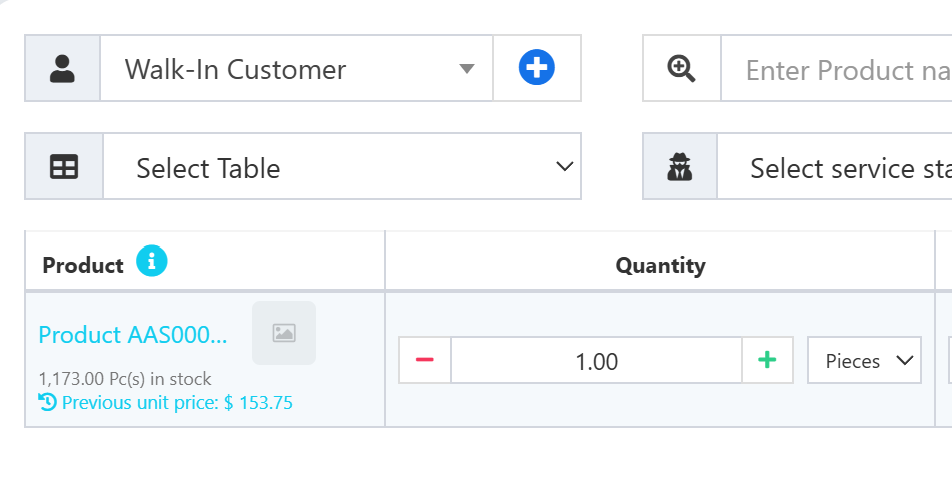
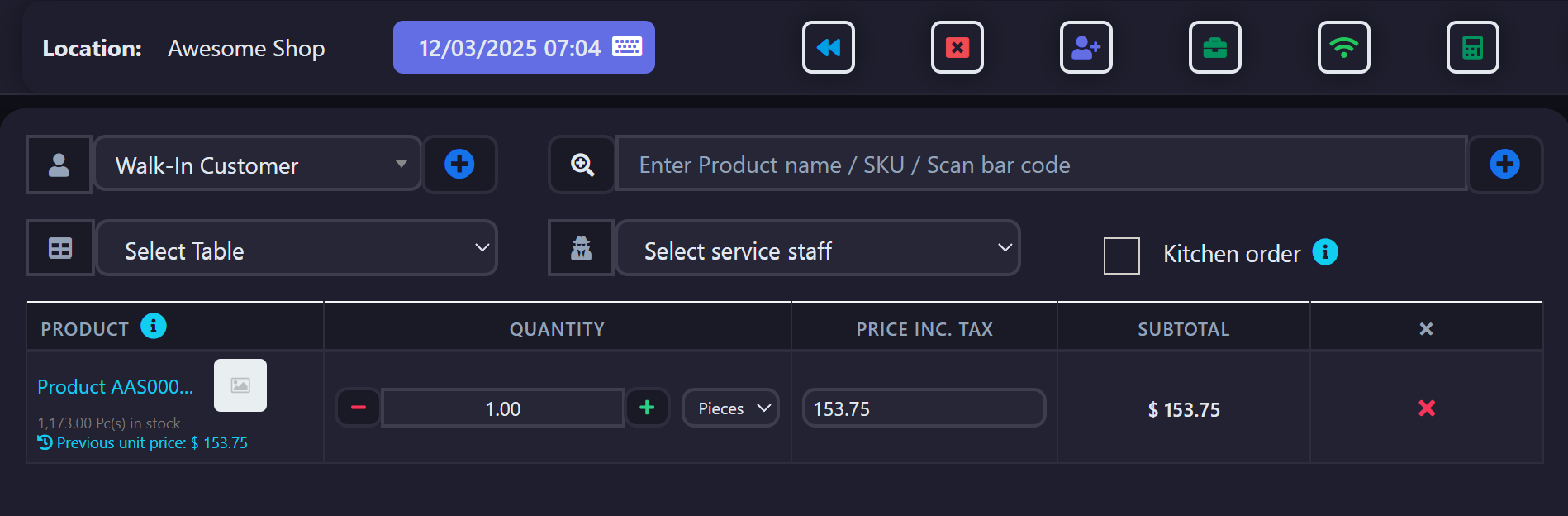
The previous price is displayed as:
1,173.00 Pc(s) in stock
[history icon] Prev. Unit Price: $XX.XX
- Color: Blue (
text-info) to differentiate from stock info - Icon: History icon (
fa-history) for visual identification - Position: Directly under the stock quantity
Troubleshooting
Issue: Previous price not showing
Solutions:
- Verify customer is selected (not blank)
- Check that customer has previous purchases for this product at this location
- Ensure previous sales are in "final" status
- Clear browser cache
Issue: Wrong price displayed
Solutions:
- Verify location_id matches current POS location
- Check transaction_date ordering (should show most recent)
- Confirm the displayed price is
unit_price_inc_taxnot base price
Issue: Translation missing
Solution:
- Add to
lang/en/lang_v1.phpif not present:
'prev_unit_price' => 'Prev. Unit Price',
Important Notes
- Only shows for customers with purchase history at the current location
- Displays price including tax (
unit_price_inc_tax) - Does not affect pricing - purely informational
- Works alongside existing discount and price group features
Related Features
Last Updated: 2025-12-03 Version: 1.0 Tested On: Ultimate POS 6.10
💛 Support this project