Fix DataTable Action Dropdown Positioning Issue (Global Solution)
Problem Description
In Ultimate POS, when users click on the action dropdown button in the last rows of any DataTable, the dropdown menu opens but gets clipped by the table container. This makes the dropdown options invisible or partially visible.
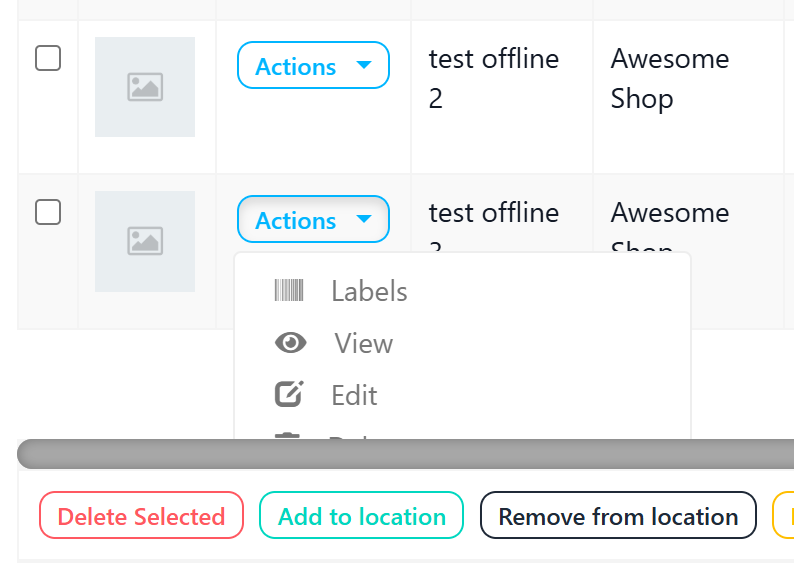
Affected Pages
- Products listing (
/products) - Contacts/Customers listing (
/contacts) - Purchases listing (
/purchases) - Sales listing (
/sells) - All pages with DataTables
Root Cause Analysis
The issue occurs due to several factors:
- Container Overflow: Parent containers (
.dataTables_wrapper,.table-responsive,.nav-tabs-custom,.tab-pane,.box-body) haveoverflow: hiddenoroverflow: auto - Bootstrap Dropdown Behavior: Bootstrap dropdowns use
position: absolutewhich is constrained by parent overflow - No Dynamic Positioning: The original implementation didn't account for viewport boundaries
Solution Overview
This is a global fix that works across all DataTables in the entire project by:
- Setting
overflow: visibleon all potential parent containers - Using
position: fixedfor dropdown menus in tables - Dynamically calculating dropdown position relative to viewport
- Auto-flipping dropdown upward when near bottom of screen
Implementation
Step 1: CSS Changes
File: resources/plugins/custom.css
Add the following CSS at the end of the file (before the sourcemap comment):
/* Fix dropdown overflow in DataTables - prevents dropdown from being clipped */
.dataTables_wrapper,
.table-responsive,
.table-responsive .dataTables_wrapper,
.box-body,
.nav-tabs-custom,
.nav-tabs-custom > .tab-content,
.tab-content,
.tab-pane,
.tab-pane.active {
    overflow: visible !important;
}

/* Make dropdown menus in tables use fixed positioning to escape overflow containers */
table .btn-group .dropdown-menu {
    position: fixed !important;
    z-index: 1060 !important;
}

/* When dropdown is near bottom of table, show it above the button (dropup) */
table .btn-group.dropup .dropdown-menu {
    top: auto !important;
    bottom: auto !important;
}
Step 2: JavaScript Changes
File: public/js/common.js
Add the following JavaScript after the DataTable defaults configuration (around line 337, after the jQuery.extend($.fn.dataTable.defaults, {...}); block):
// Fix dropdown overflow in DataTables - position dropdown with fixed positioning
$(document).on('show.bs.dropdown', 'table .btn-group', function () {
    var $btnGroup = $(this);
    var $dropdown = $btnGroup.find('.dropdown-menu');
    var $button = $btnGroup.find('[data-toggle="dropdown"]');

    // Wait for dropdown to be rendered
    setTimeout(function () {
        var buttonOffset = $button.offset();
        var buttonHeight = $button.outerHeight();
        var buttonWidth = $button.outerWidth();
        var dropdownHeight = $dropdown.outerHeight();
        var dropdownWidth = $dropdown.outerWidth();
        var windowHeight = $(window).height();
        var windowWidth = $(window).width();
        var scrollTop = $(window).scrollTop();

        // Calculate position relative to viewport
        var topPosition = buttonOffset.top - scrollTop + buttonHeight;
        var leftPosition = buttonOffset.left;

        // Check if dropdown would go below viewport
        var spaceBelow = windowHeight - topPosition;
        if (spaceBelow < dropdownHeight + 10) {
            // Position above the button
            topPosition = buttonOffset.top - scrollTop - dropdownHeight;
            $btnGroup.addClass('dropup');
        } else {
            $btnGroup.removeClass('dropup');
        }

        // Check if dropdown would go outside right edge
        if (leftPosition + dropdownWidth > windowWidth) {
            leftPosition = buttonOffset.left + buttonWidth - dropdownWidth;
        }

        // Apply fixed positioning
        $dropdown.css({
            position: 'fixed',
            top: topPosition + 'px',
            left: leftPosition + 'px',
            right: 'auto',
            bottom: 'auto',
        });
    }, 0);
});

// Reset dropdown styles when hidden
$(document).on('hide.bs.dropdown', 'table .btn-group', function () {
    var $dropdown = $(this).find('.dropdown-menu');
    $(this).removeClass('dropup');
    $dropdown.css({
        position: '',
        top: '',
        left: '',
        right: '',
        bottom: '',
    });
});

// Close dropdown when scrolling (since fixed position doesn't follow scroll)
var scrollTimer;
$(window).on('scroll', function () {
    clearTimeout(scrollTimer);
    scrollTimer = setTimeout(function () {
        $('table .btn-group.open').removeClass('open');
    }, 50);
});
How It Works
CSS Explanation
| CSS Rule | Purpose |
|---|---|
overflow: visible !important | Allows dropdown to extend beyond container boundaries |
position: fixed !important | Removes dropdown from document flow, positions relative to viewport |
z-index: 1060 !important | Ensures dropdown appears above other elements (higher than Bootstrap modals) |
JavaScript Explanation
- Event Binding: Listens for Bootstrap's
show.bs.dropdownevent on table btn-groups - Position Calculation:
- Gets button's absolute position on page
- Calculates position relative to viewport (accounting for scroll)
- Determines available space below the button
- Smart Positioning:
- If space below is sufficient → dropdown opens downward
- If space below is insufficient → adds
dropupclass and positions above - Also handles right edge overflow
- Scroll Handling: Closes dropdown on scroll since fixed elements don't follow scroll
- Cleanup: Resets styles when dropdown closes
Visual Flow
┌─────────────────────────────────────┐
│  DataTable                          │
│  ┌───────────────────────────────┐  │
│  │ Row 1  │ Actions ▼ │          │  │
│  │ Row 2  │ Actions ▼ │          │  │
│  │ Row 3  │ Actions ▼ │          │  │
│  │ Row 4  │ Actions ▼ │ ← Opens  │  │
│  │        │ ┌─────────┐  Down    │  │
│  │        │ │ View    │          │  │
│  │        │ │ Edit    │          │  │
│  │        │ │ Delete  │          │  │
│  │        │ └─────────┘          │  │
│  │ Row 5  │ Actions ▲ │ ← Opens  │  │
│  └───────────────────────────────┘  │
│           │ ┌─────────┐    Up       │
│           │ │ View    │             │
│           │ │ Edit    │             │
│           │ │ Delete  │             │
│           │ └─────────┘             │
└─────────────────────────────────────┘
Testing
Test Cases
| Scenario | Action | Expected Result |
|---|---|---|
| Top rows | Click Actions button | Dropdown opens downward |
| Bottom rows | Click Actions button | Dropdown opens upward |
| Right-aligned columns | Click Actions button | Dropdown aligns to right edge |
| Scroll while open | Scroll the page | Dropdown closes automatically |
| Multiple pages | Test on /products, /contacts, /sells | Works on all pages |
Browser Compatibility
- ✅ Chrome (latest)
- ✅ Firefox (latest)
- ✅ Safari (latest)
- ✅ Edge (latest)
Troubleshooting
Dropdown Still Clipping
Check: Ensure CSS is loaded after Bootstrap CSS
<!-- In your layout file -->
<link rel="stylesheet" href="/plugins/bootstrap/css/bootstrap.min.css" />
<link rel="stylesheet" href="/plugins/custom.css" />
<!-- Must be after Bootstrap -->
JavaScript Not Working
Check: Ensure common.js loads after jQuery and Bootstrap
<script src="/js/vendor.js"></script>
<!-- Contains jQuery -->
<script src="/js/common.js"></script>
<!-- Must be after vendor.js -->
Dropdown Opens in Wrong Position
Debug: Add console logging
$(document).on('show.bs.dropdown', 'table .btn-group', function () {
    var $button = $(this).find('[data-toggle="dropdown"]');
    console.log('Button offset:', $button.offset());
    console.log('Window height:', $(window).height());
    console.log('Scroll top:', $(window).scrollTop());
});
Alternative Approaches
Approach 1: Page-Specific Fix (Not Recommended)
Add JavaScript to individual pages - requires maintaining code in multiple places.
Approach 2: CSS-Only with position: fixed (Partial)
Works but dropdown position is static, doesn't auto-flip.
Approach 3: Global Solution (Recommended) ✅
The solution documented above - one-time implementation, works everywhere.
Files Modified
| File | Change Type | Lines |
|---|---|---|
resources/plugins/custom.css | CSS added | ~25 lines at end |
public/js/common.js | JavaScript added | ~55 lines after DataTable defaults |
Version Compatibility
- Ultimate POS: v6.x and above
- Laravel: 9.x
- Bootstrap: 3.x
- DataTables: 1.10.x
Last Updated: December 2025 Version: 2.0 (Global Solution) Tested On: Ultimate POS v6.10
💛 Support this project